
Introduction
Smart Security Systems: Modern Ways to Protect Your Home | A home can have strong doors, expensive locks, and a good neighborhood, yet still have security blind spots. You may not know when someone approaches your front door, whether a side window has been opened, or what is happening at home while you’re away.
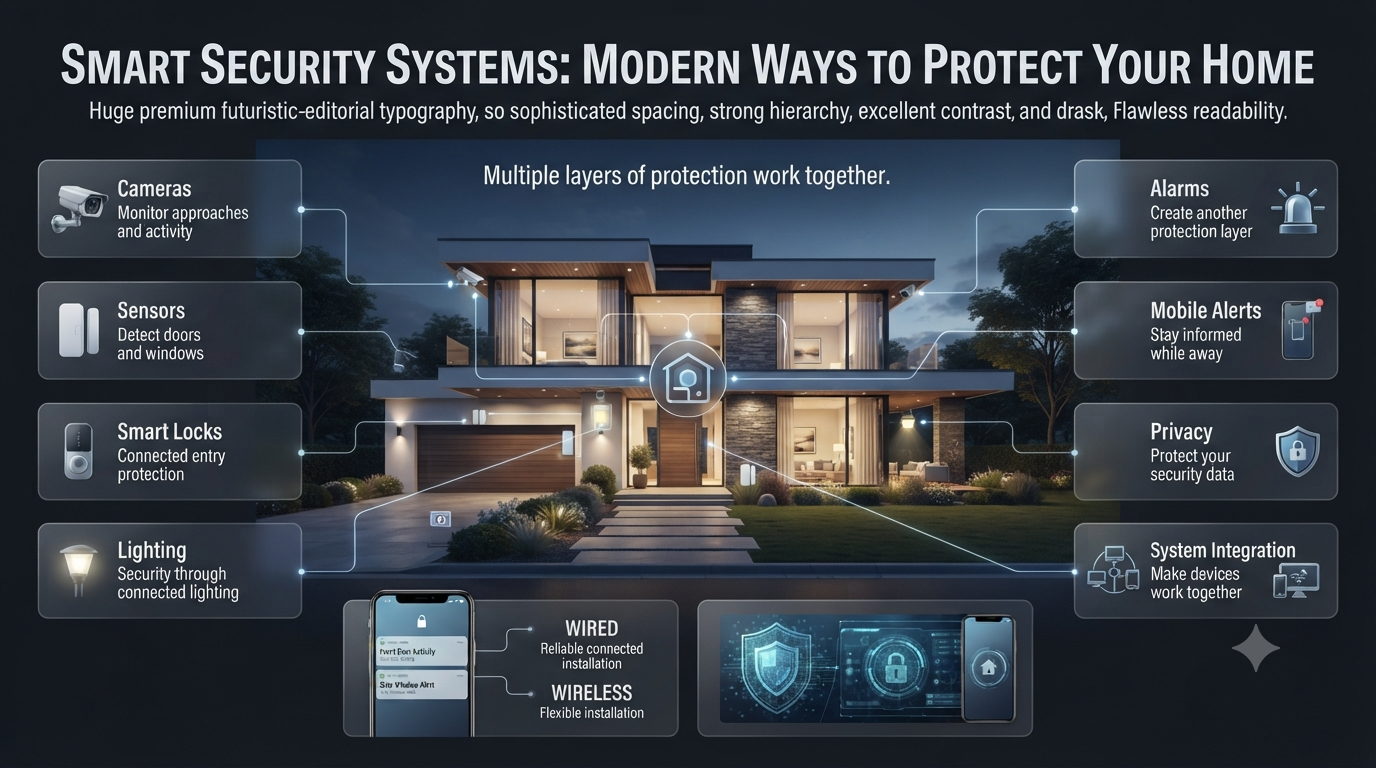
That’s why Smart Security Systems have become an important part of modern home planning. Instead of depending on one alarm or camera, a smart setup connects cameras, sensors, smart locks, lighting, alarms, and mobile alerts to create several layers of protection.
But buying more devices doesn’t automatically make a home safer. The real goal is to choose the right technology, place it correctly, protect your privacy, and make sure everything works together.
This guide explains how smart security systems work, which devices matter most, how to choose the right setup, wired versus wireless options, installation mistakes, privacy concerns, and practical ways to integrate security into a stylish modern home.
What Are Smart Security Systems?
Smart security systems are connected home-security solutions that combine devices such as cameras, sensors, alarms, smart locks, and mobile apps to monitor and protect a property. They can detect activity, send alerts, record events, and allow homeowners to manage security remotely.
Unlike traditional security equipment that may operate independently, smart devices can communicate with each other.
For example, a door sensor can detect an unexpected opening while a nearby camera records the event and your smartphone receives an alert.
A typical smart security setup may include:
- Security cameras
- Video doorbells
- Door and window sensors
- Motion detectors
- Smart locks
- Alarm systems
- Glass-break sensors
- Smoke and carbon-monoxide detectors
- Water-leak sensors
- Smart lighting
- Mobile applications
- Professional monitoring
The most useful systems are not necessarily the ones with the greatest number of devices. They’re the ones that address the property’s actual vulnerabilities.
How Do Smart Security Systems Work?
Smart security systems work by connecting sensors, cameras, alarms, and access-control devices through a central platform, hub, local network, or cloud service.
The basic process is simple:
Detect → Verify → Alert → Respond
A door sensor may detect movement first. A camera can then provide visual verification. The system sends an alert to the homeowner, who can decide whether to contact a neighbor, security provider, or emergency service.
Some systems can also automate the response.
For example:
Door Opens
     ↓
Sensor Detects Entry
     ↓
Camera Verifies Activity
     ↓
Mobile Alert Sent
     ↓
Alarm / Lighting Activated
     ↓
Homeowner Responds
Not every system uses exactly this structure. Some devices connect directly to Wi-Fi, while others use a dedicated hub or another communication protocol.
The important thing is compatibility. Before buying several devices, make sure they can communicate with the platform you intend to use.
Why Are Smart Security Systems Important for Modern Homes?
Modern homes are becoming more connected. Smart lighting, thermostats, appliances, locks, cameras, and entertainment systems may all communicate through a home network.
Security should therefore be planned as part of the home’s overall technology rather than added randomly after everything else is finished.
A thoughtfully planned security system can help homeowners:
- Monitor entrances remotely
- Receive immediate alerts
- Verify visitors
- Control access
- Record suspicious activity
- Detect smoke or water leaks
- Manage temporary guest access
- Monitor outdoor areas
- Improve nighttime visibility
- Respond faster to unusual events
If you’re planning a broader technology-focused home, the ideas available through DesignMode24 Interior Design can also help you think about how security technology fits into the home’s overall functionality and appearance.
What Are the Main Components of a Smart Security System?
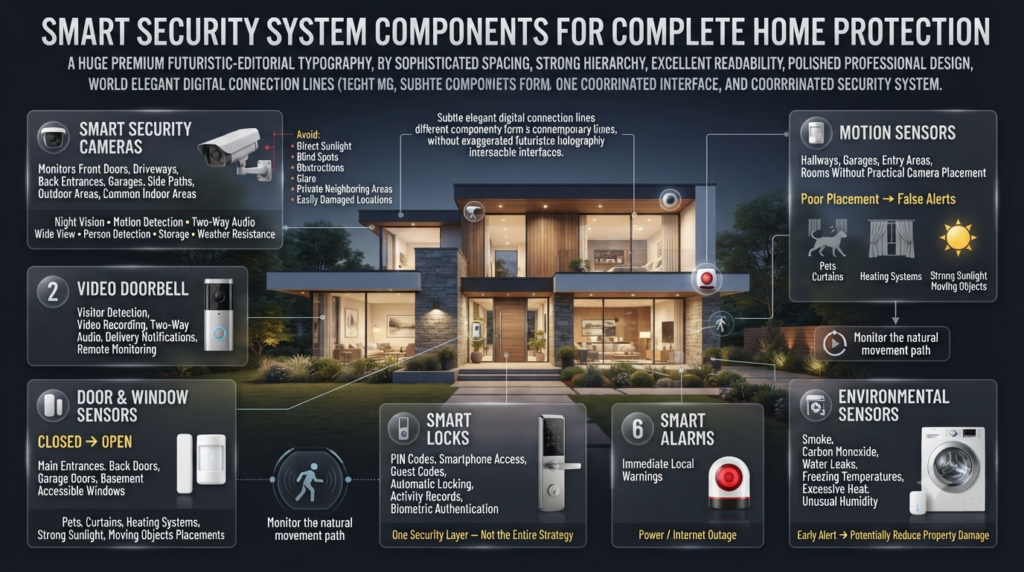
Different homes need different combinations of devices. Understanding each component helps you avoid spending money on equipment you don’t actually need.
Smart Security Cameras
Security cameras provide visual information.
They’re useful for monitoring:
- Front doors
- Driveways
- Back entrances
- Garages
- Side paths
- Outdoor areas
- Common indoor areas
Important features include:
- Night vision
- Motion detection
- Two-way audio
- Wide viewing angles
- High-quality video
- Person detection
- Local storage
- Cloud storage
- Weather resistance
Don’t choose a camera based on resolution alone. A high-resolution camera placed badly can be less useful than a moderately priced camera with excellent positioning and lighting.
Professional Camera Placement Tip
Before mounting a camera, stand where it will be installed and consider exactly what the lens will capture.
Avoid:
- Direct sunlight into the lens
- Large blind spots
- Obstructions
- Excessive glare
- Private neighboring areas
- Locations where the camera can easily be damaged
Video Doorbells
A video doorbell combines visitor detection, video recording, and communication in one device.
It’s particularly useful because the front door is one of the most important areas of a residential property.
Depending on the model, homeowners can:
- See visitors remotely
- Speak through two-way audio
- Receive delivery notifications
- Record activity
- Monitor the entrance while away
A video doorbell can also complement a traditional door lock rather than replacing the need for physical security.
Door and Window Sensors
Door and window sensors are simple but highly valuable.
They detect when an opening point changes from closed to open.
They’re particularly useful for:
- Main entrances
- Back doors
- Garage doors
- Basement entrances
- Easily accessible windows
One advantage is that sensors don’t need to visually identify an event. They simply tell the system that a protected opening has changed status.
Motion Sensors
Motion sensors detect movement within a defined area.
They’re useful for hallways, garages, entry areas, and rooms where cameras aren’t practical.
However, installation matters.
Poor placement can create false alerts caused by:
- Pets
- Curtains
- Heating systems
- Strong sunlight
- Moving objects
💡 Pro Tip: Don’t install motion sensors simply because you have an empty wall. First identify the natural movement path you actually want to monitor.
Smart Locks
Smart locks allow homeowners to control access electronically.
Depending on the model, they may provide:
- PIN codes
- Smartphone access
- Temporary guest codes
- Automatic locking
- Activity records
- Biometric authentication
They’re especially useful for families, rental properties, home offices, and households that frequently give temporary access to visitors.
However, smart locks should be treated as one layer of security rather than the entire security strategy.
Smart Alarms
Alarms provide immediate local warnings when suspicious activity is detected.
A loud alarm can draw attention and may discourage someone from continuing an unauthorized entry.
For better resilience, consider whether the alarm can continue functioning during a power or internet outage.
Environmental Sensors
Security isn’t limited to burglars.
Smart sensors can also detect:
- Smoke
- Carbon monoxide
- Water leaks
- Freezing temperatures
- Excessive heat
- Unusual humidity
A water sensor beneath a washing machine or sink, for example, may alert you before a small leak becomes major property damage.
Wired vs. Wireless Smart Security Systems
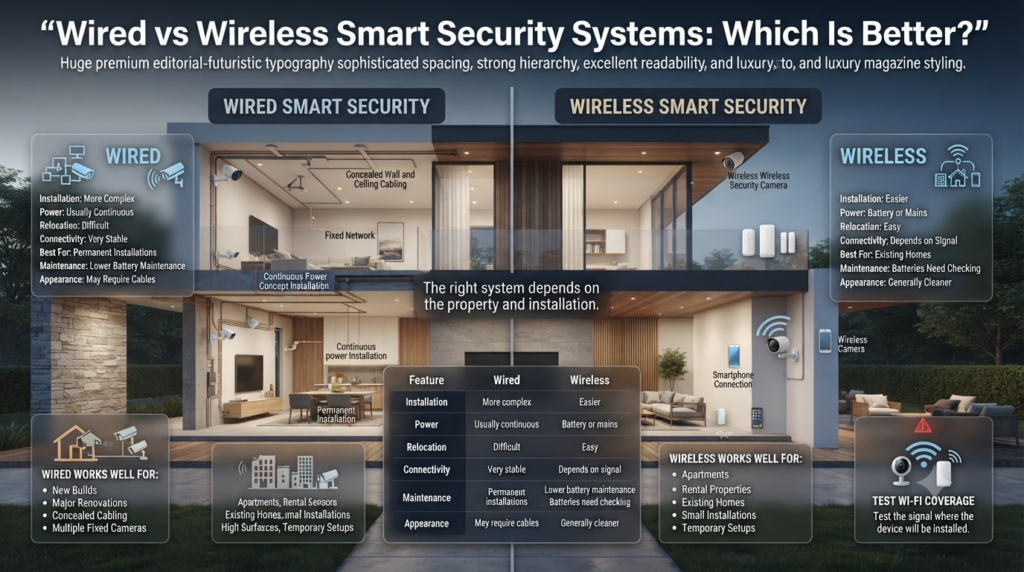
The choice between wired and wireless security depends on your property, installation requirements, budget, and reliability expectations.
| Feature | Wired | Wireless |
|---|---|---|
| Installation | More complex | Easier |
| Power | Usually continuous | Battery or mains |
| Relocation | Difficult | Easy |
| Connectivity | Very stable | Depends on signal |
| Best for | Permanent installations | Existing homes |
| Maintenance | Lower battery maintenance | Batteries need checking |
| Appearance | May require cables | Generally cleaner |
When Is a Wired System Better?
Wired equipment makes sense when you’re building a home or carrying out a major renovation.
Cabling can be concealed inside walls and ceilings, creating a clean installation while providing reliable power and network connectivity.
It’s particularly attractive for multiple fixed cameras.
When Is Wireless Better?
Wireless systems are often better for:
- Apartments
- Rental properties
- Existing homes
- Small installations
- Temporary setups
Installation is usually faster because you don’t need extensive cabling.
⚠ Common Mistake: Assuming wireless automatically means reliable. Always test Wi-Fi coverage at the exact location where each camera or device will be installed.
How Many Security Cameras Does a Home Need?
There isn’t a universal number.
The right number depends on entrances, property layout, blind spots, and risk.
For many homes, priority areas include:
- Front entrance
- Back entrance
- Garage
- Driveway
- Side access
- Other vulnerable outdoor areas
Avoid placing cameras simply to increase the camera count.
One strategically positioned camera can be more valuable than several cameras with overlapping views.
Camera Planning Checklist
Before installation, ask:
- Does the camera cover the intended entrance?
- Is the image clear at night?
- Could sunlight cause glare?
- Is the Wi-Fi signal reliable?
- Can someone easily tamper with it?
- Does it capture unnecessary private areas?
- Is the mounting surface strong enough?
How Do You Choose the Right Smart Security System?
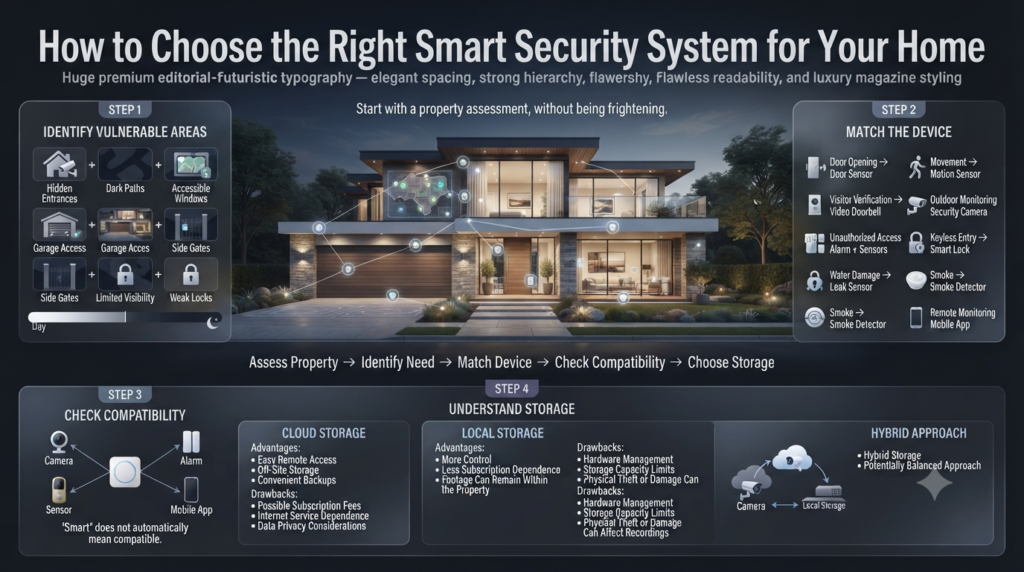
The best system starts with a property assessment.
Step 1: Identify Vulnerable Areas
Walk around your home during both daytime and nighttime.
Look for:
- Hidden entrances
- Dark paths
- Accessible windows
- Garage access
- Side gates
- Areas invisible from neighboring properties
- Weak physical locks
This gives you a practical security map.
Step 2: Decide What You Need to Detect
Different risks require different equipment.
| Problem | Recommended Device |
| Door opening | Door sensor |
| Movement | Motion sensor |
| Visitor verification | Video doorbell |
| Outdoor monitoring | Security camera |
| Unauthorized access | Alarm + sensors |
| Keyless entry | Smart lock |
| Water damage | Leak sensor |
| Smoke | Smoke detector |
| Remote monitoring | Mobile app |
Step 3: Check Compatibility
Don’t buy products individually without checking their ecosystem.
A camera, smart lock, sensor, and alarm may all be “smart” but still fail to integrate properly.
Check:
- Supported platforms
- Hub requirements
- App compatibility
- Subscription requirements
- Local-storage options
- Automation support
Step 4: Understand Storage
Security footage can be stored locally, on a memory card, through a network recorder, or in the cloud.
Cloud Storage
Advantages:
- Easy remote access
- Off-site storage
- Convenient backups
Drawbacks:
- Possible subscription fees
- Dependence on internet services
- Data privacy considerations
Local Storage
Advantages:
- More control
- Less subscription dependence
- Footage can remain within the property
Drawbacks:
- Hardware management
- Storage capacity limitations
- Physical theft or damage can affect recordings
A hybrid approach can sometimes provide the best balance.
Are Smart Security Systems Worth It?
For many homeowners, yes—but only when the system solves real security problems.
The value isn’t simply the ability to open a camera app.
A good system can provide:
- Faster awareness
- Remote monitoring
- Access control
- Video verification
- Environmental protection
- Convenience
- Security automation
For example, imagine you’re away from home and receive a front-door motion alert.
Instead of wondering whether the alert came from a person, pet, or tree, you can check the camera immediately.
That’s the practical advantage of combining detection with verification.
How Can Smart Security Fit Into Interior Design?
Security technology doesn’t have to make a home look like a control room.
Modern equipment can be incorporated into the home’s visual language through thoughtful placement.
This becomes especially important in minimalist and contemporary homes where exposed wires, oversized equipment, or poorly positioned devices can disrupt the design.
If you’re coordinating technology with a broader Interior Design plan, consider security placement at the same time as lighting, furniture, wall finishes, and circulation.
For a clean, understated home, Minimalist Interior Design principles can help guide discreet technology placement.
Similarly, Contemporary Interior Design can provide useful inspiration for integrating modern technology without making the space feel overly technical.
How Can You Hide or Blend Security Equipment?
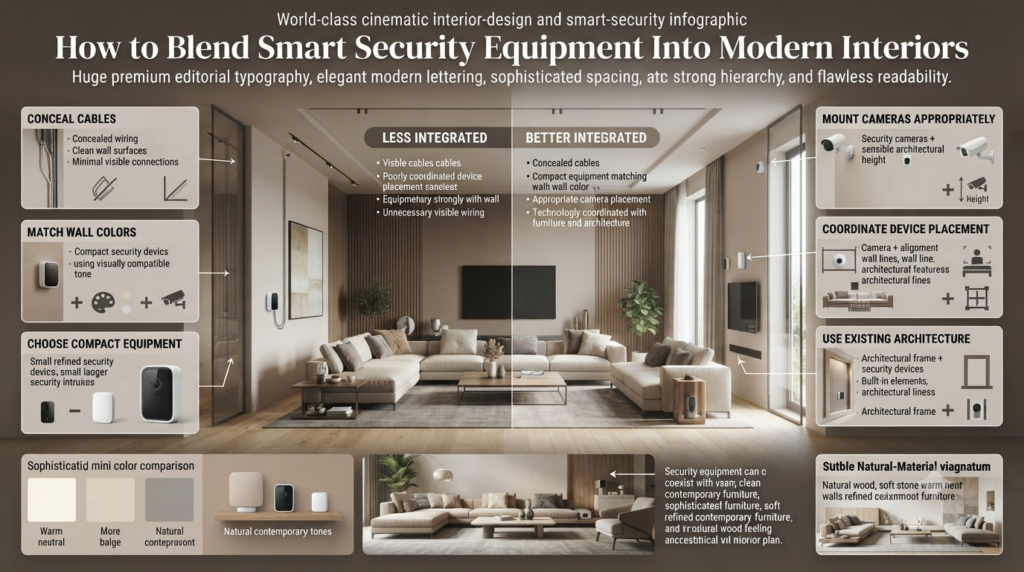
Security devices should remain functional, but they don’t always need to dominate the room.
Consider:
- Concealing cables
- Matching devices with wall colors
- Choosing compact equipment
- Mounting cameras at appropriate heights
- Avoiding unnecessary visible wiring
- Coordinating device placement with furniture
- Using existing architectural features where appropriate
Wall color can also influence how noticeable equipment appears. When planning a security installation alongside a room refresh, ideas from the Paint Color section can help you think about how equipment visually interacts with the surrounding walls.
For homes that favor clean lines and natural materials, Natural Wood Interior ideas can also influence how visible technology should be within the overall design.
Smart Security for Minimalist, Japandi, and Scandinavian Homes
Different interior styles can accommodate smart technology in different ways.
Minimalist Homes
A minimalist home benefits from equipment that doesn’t create visual clutter.
Focus on:
- Discreet cameras
- Concealed wiring
- Limited visible devices
- Integrated lighting
- Clean mounting positions
For additional inspiration, Minimalist Home Design can help when you’re balancing technology with simplicity.
Japandi Homes
Japandi interiors emphasize calmness, natural materials, functionality, and visual restraint.
Security equipment should therefore feel intentional rather than intrusive.
Ideas from Japandi Home Design can be useful when deciding how technology can coexist with warm materials and uncluttered spaces.
You can also explore Japandi Home Decor when considering smaller technology accessories and how they interact with decorative elements.
For a more contemporary interpretation, Modern Japandi Interior can provide another perspective on combining modern functionality with a calm visual environment.
Scandinavian Homes
Scandinavian interiors typically emphasize practical design, light, simplicity, and functionality.
That makes them naturally compatible with smart-home technology when devices are selected carefully.
See Scandinavian Interior Design for ideas on maintaining a functional yet visually light environment.
Smart Security Systems for Different Types of Homes
Apartments
Apartment residents usually need fewer devices than owners of large detached homes.
A practical setup may include:
- Main-door sensor
- Video doorbell where permitted
- Smart lock
- Indoor camera where appropriate
- Smoke detector
- Water-leak sensor
Always check building rules before installing external cameras or changing locks.
Family Homes
Family homes often have several access points.
Consider:
- Front-door camera
- Back-door sensor
- Garage monitoring
- Outdoor cameras
- Motion sensors
- Smart locks
- Environmental sensors
Large Properties
Large properties require more detailed planning.
You may need:
- Multiple camera zones
- Gate monitoring
- Reliable network infrastructure
- Outdoor lighting
- Long-range connectivity
- Professional installation
This is where broader Home Improvement planning can become useful because cabling, lighting, doors, landscaping, and security often need to work together.
How Does a Smart Security System Handle Power Outages?
This depends on the equipment.
Some systems stop working when power is lost. Others continue operating through batteries, UPS systems, local storage, or backup communication.
Before buying, ask:
What happens if my electricity goes out?
Look for:
- Battery backup
- Local recording
- Backup communication
- Battery-powered sensors
- UPS compatibility
The goal is resilience.
A system that works perfectly during normal conditions but fails completely during an outage has an obvious weakness.
⭐ Expert Tip: Always test your security system during a controlled power or internet interruption so you understand exactly which features remain operational.
How Can You Protect Smart Security Systems From Hacking?
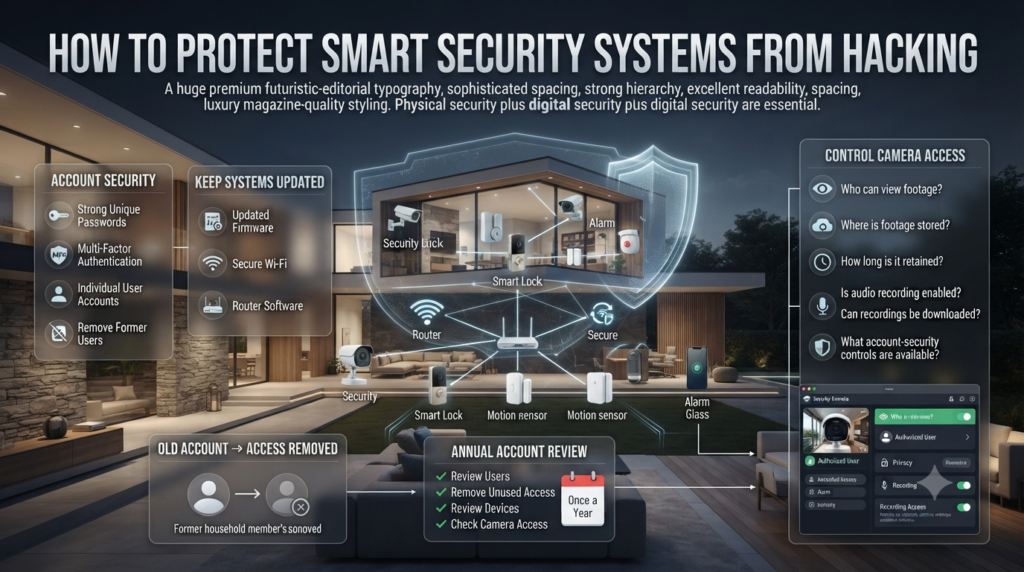
Smart security isn’t only about physical devices. Your digital security matters too.
Use:
- Strong unique passwords
- Multi-factor authentication
- Updated firmware
- Secure Wi-Fi
- Updated router software
- Individual user accounts where supported
- Removed access for former household members
Never leave old accounts active simply because someone no longer uses the system.
For cameras, also review who has access to recordings.
Ask:
- Who can view footage?
- Where is footage stored?
- How long is it retained?
- Is audio recording enabled?
- Can recordings be downloaded?
- Does the provider offer account-security controls?
📌 Quick Tip: Review your smart-home accounts at least once a year and remove devices or users you no longer need.
Common Smart Security Mistakes to Avoid
Buying Too Many Cameras
More cameras don’t automatically mean better security.
Why it happens: Homeowners confuse quantity with coverage.
Why it’s harmful: You may spend money on overlapping views while missing a critical entrance.
Better approach: Map the property first.
Ignoring Wi-Fi Coverage
Wireless cameras require dependable connectivity.
Why it happens: The camera works during setup but struggles later.
Why it’s harmful: Poor connectivity can cause delayed alerts or missing footage.
Better approach: Test the signal before permanently mounting the device.
Choosing Incompatible Devices
Buying individual products without checking compatibility can create a fragmented system.
Better approach: Select the ecosystem first and expand from there.
Ignoring Software Updates
Smart security products are connected computers.
Better approach: Keep firmware and apps updated.
Using Weak Passwords
A powerful security camera can become a liability if the controlling account is poorly protected.
Better approach: Use unique credentials and multi-factor authentication.
Ignoring Privacy
Security cameras should never be positioned carelessly.
Avoid recording areas where people reasonably expect privacy.
How Can Smart Security Work With Home Design?
Good security planning should happen before the final design is completed.
For example, during a renovation you may already be deciding:
- Where electrical outlets go
- Where lighting is installed
- How walls are finished
- Where furniture sits
- How people move through rooms
- Where network cables will run
Security can be incorporated into the same planning process.
If you’re working on practical upgrades, DIY Projects can complement the physical planning side of smaller home improvements, while broader Home Design Ideas can help you consider security as part of the home’s overall layout rather than an afterthought.
Smart Security Systems: Pros and Cons
| Pros | Cons |
| Remote monitoring | Internet dependency |
| Mobile alerts | False notifications |
| Video verification | Privacy concerns |
| Smart access control | Subscription costs |
| Home automation | Compatibility problems |
| Environmental monitoring | Battery maintenance |
| Expandable system | Cybersecurity risks |
The right system balances convenience with reliability.
What Is the Best Way to Build a Smart Security System?
A practical installation can follow this sequence:
Step 1: Assess the property
Identify entrances, blind spots, and environmental risks.
Step 2: Improve physical security
Check doors, locks, windows, gates, and garage access.
Step 3: Add sensors
Use door, window, motion, and environmental sensors where needed.
Step 4: Add cameras
Prioritize entrances and vulnerable exterior areas.
Step 5: Add smart access
Install smart locks if they solve a real access-control problem.
Step 6: Configure alerts
Only enable notifications that provide useful information.
Step 7: Secure accounts
Use strong passwords and multi-factor authentication.
Step 8: Test everything
Test cameras, sensors, alarms, notifications, locks, and backup power.
Step 9: Review periodically
Security needs change when the property, household, network, or technology changes.
What should a smart security system include?
A well-designed smart security system should include the devices that address your home’s actual vulnerabilities. For most homes, that means a combination of security cameras, door and window sensors, motion detectors, an alarm, and reliable access control. Depending on the property, you may also benefit from a video doorbell, smart locks, smoke detectors, water-leak sensors, and outdoor lighting.
The real strength comes from making these devices work together. A sensor can detect that a door has opened, a camera can verify what happened, and the mobile app can immediately alert you. This layered approach is far more practical than simply installing several unrelated smart devices.
Important points to consider:
Protect vulnerable doors and windows first.
Use cameras for important areas rather than every room.
Add smart locks when controlled access is genuinely useful.
Consider environmental sensors for smoke, leaks, and other risks.
Check device compatibility before buying equipment.
Are smart security systems worth the investment?
Smart security systems can be a valuable investment when they’re designed around real security needs. Their biggest advantage is the combination of monitoring, alerts, remote access, and automation. You can check what’s happening at home, verify visitors, receive intrusion alerts, or respond to a problem even when you’re away.
The mistake is assuming that an expensive system automatically provides better protection. A premium camera won’t compensate for an unsecured back door, poor Wi-Fi coverage, or badly positioned equipment. A carefully planned system with fewer devices can often provide much more useful protection.
Before investing, consider:
Which areas of your property are most vulnerable?
Do you need professional monitoring?
Is your Wi-Fi strong enough for wireless equipment?
Will cloud storage create recurring costs?
Does the system have backup power?
Can you expand the system later?
Do smart security cameras work without Wi-Fi or internet?
This depends on the specific camera and its storage method. Some cameras can continue recording to local storage when the internet goes down, while others depend heavily on an internet connection for recording, cloud storage, remote viewing, and notifications. A wired network connection can improve reliability, but it doesn’t necessarily preserve cloud-based features during an internet outage.
Before buying a camera, it’s important to understand exactly what happens when your internet connection fails. Security equipment should ideally retain at least some essential functions during an outage rather than becoming completely useless.
Look for features such as:
Local video recording
Memory-card or network storage
Battery backup
UPS support
Offline alarm functions
Backup communication
Automatic reconnection
Professional advice: Test your system after installation. A controlled outage can reveal weaknesses that aren’t obvious during normal operation.
Are smart security systems safe from hacking?
Smart security systems require the same cybersecurity attention as other connected devices. Cameras, smart locks, alarms, and hubs may connect to your home network and online accounts, so weak passwords or outdated software can create unnecessary risks.
The best protection is a combination of secure equipment and good account management. Use strong, unique passwords, enable multi-factor authentication, keep firmware updated, and regularly review which people and devices have access to your system.
Essential security practices include:
Use unique passwords for security accounts.
Enable multi-factor authentication when available.
Keep cameras, hubs, apps, and routers updated.
Remove old users and unused devices.
Secure your home Wi-Fi network.
Review cloud-storage and privacy settings.
Avoid outdated equipment that no longer receives security updates.
A smart security system should protect your physical home without creating an unnecessary digital vulnerability.
What is the best way to set up smart security for a home?
The best approach is to start with a security assessment rather than immediately buying equipment. Walk around your property and identify vulnerable doors, accessible windows, garages, side entrances, dark areas, and places that aren’t easily visible from inside the house.
Once you’ve identified those risks, choose devices that solve specific problems. Strong physical security should come first, followed by sensors, cameras, alarms, access control, and environmental monitoring where needed. The final step is to configure alerts, secure your accounts, test the equipment, and review the system regularly.
A practical setup process includes:
Assess the property’s vulnerable areas.
Improve doors, windows, locks, and physical access.
Install door, window, and motion sensors where necessary.
Add cameras to important entrances and outdoor areas.
Use smart locks for controlled access.
Configure useful alerts without creating notification overload.
Secure accounts with strong passwords and multi-factor authentication.
Test cameras, sensors, alarms, and backup systems.
Review the entire setup regularly.
The best smart security system isn’t the one with the most gadgets. It’s the one where every device has a clear purpose and multiple security layers work together when something goes wrong.
Conclusion
Smart security systems have changed the way homeowners protect and manage their properties. Instead of relying on a single alarm or camera, a well-planned system combines cameras, sensors, smart locks, alarms, lighting, and mobile alerts to create several layers of protection. The real value comes from how these devices work together, not from simply having more technology around the house.
Before choosing equipment, focus on your property’s actual needs. Identify vulnerable entrances, blind spots, poorly lit areas, and access points that need additional protection. Then choose reliable devices that fit your home, network, budget, and daily routine. Don’t overlook cybersecurity, privacy, backup power, and regular system testing, because these details can make a major difference when the system is actually needed.
A smart home should feel comfortable and secure, not complicated. With thoughtful planning and the right combination of technology, Smart Security Systems can provide greater awareness, easier access control, faster alerts, and stronger everyday protection while still fitting naturally into your home’s design and lifestyle.
Leave a Reply