Introduction
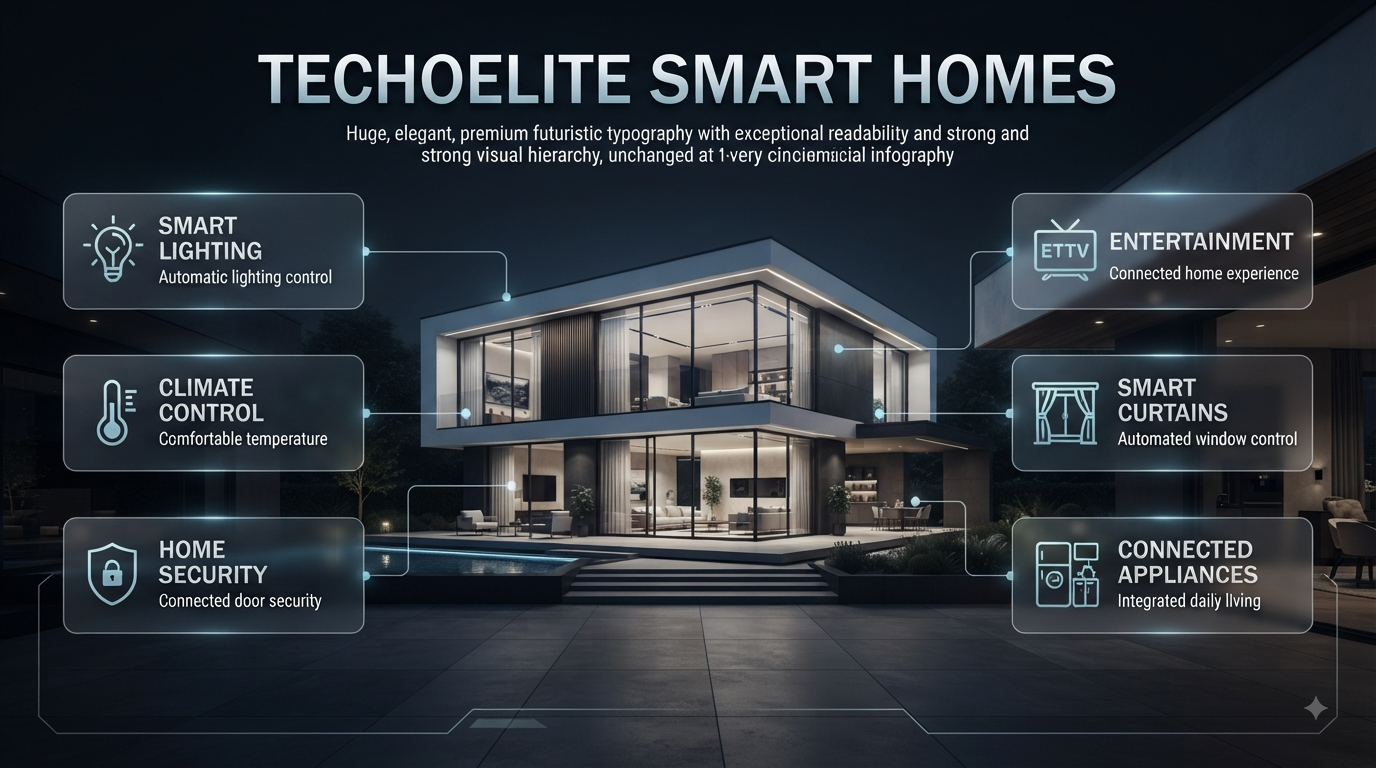
Techoelite Smart Homes | Imagine coming home after a long day and having the lights turn on automatically, the temperature already comfortable, the doors secured, and your preferred entertainment ready without touching several different switches. That is the practical promise behind Techoelite smart homes: using connected technology to make everyday living easier, safer, more comfortable, and more efficient.
A smart home, however, is not simply a collection of expensive gadgets. The real value comes from how well different systems work together and whether those systems actually solve problems in your daily routine. A beautifully designed home with intelligent lighting, security, climate control, automated curtains, connected appliances, and carefully planned controls can feel remarkably simple to use.
If you are planning a connected home alongside your wider living-space improvements, DesignMode24 Interior Design can also provide useful inspiration for combining technology with practical interior design.
This guide takes a practical look at Techoelite smart homes, including how smart-home systems work, which technologies matter most, how to plan an installation, how smart technology can complement interior design, common mistakes to avoid, and how to build a system that remains useful instead of becoming a house full of gadgets you rarely use.
What Are Techoelite Smart Homes?
Techoelite smart homes refer to homes where connected technologies are integrated to give homeowners greater control over everyday systems such as lighting, security, climate, entertainment, appliances, and access.
Instead of treating every device as a separate product, a smart-home approach connects compatible systems so they can be controlled through applications, voice commands, sensors, schedules, scenes, or automated routines.
For example, a homeowner might create a simple “Leaving Home” routine. With one command, selected lights can switch off, doors can lock, the security system can activate, and certain appliances can be turned off.
The important distinction is automation versus individual control.
A smart bulb that can be controlled from your phone is useful. But a group of lights that automatically responds to occupancy, time of day, and your preferred routine is much more powerful.
Why Is Smart Home Integration Important?
Smart-home integration matters because modern homes contain many independent systems. Lighting, heating and cooling, security cameras, locks, televisions, speakers, blinds, appliances, and energy controls can all require different interfaces.
Without proper planning, homeowners can end up with five different apps and several disconnected devices.
With a coordinated system, those individual products can become part of a single experience.
A useful smart-home setup should answer questions such as:
- What should happen when I wake up?
- What should happen when I leave?
- How should the home behave at night?
- How can I know when something unusual happens?
- Which devices should respond automatically?
- Which controls should remain manual?
- How can technology support the home’s interior design?
This is why smart-home planning should begin with lifestyle requirements, not a shopping list.
What Makes a Smart Home Different From a Connected Home?
The terms “connected home” and “smart home” are often used interchangeably, but there is a useful distinction.
A connected home may simply contain devices that communicate through a network or can be controlled remotely.
A smart home goes further by using automation and rules to make those devices respond to conditions.
For example:
Connected:
You open an app and switch the bedroom light on.
Smart:
A motion sensor detects movement after sunset and activates the bedroom light at a comfortable brightness.
The second approach reduces the amount of manual interaction required.
This doesn’t mean every function should be automated. In fact, too much automation can make a home frustrating. The goal is to automate repetitive actions while keeping important decisions under the homeowner’s control.
What Features Are Most Important in Techoelite Smart Homes?
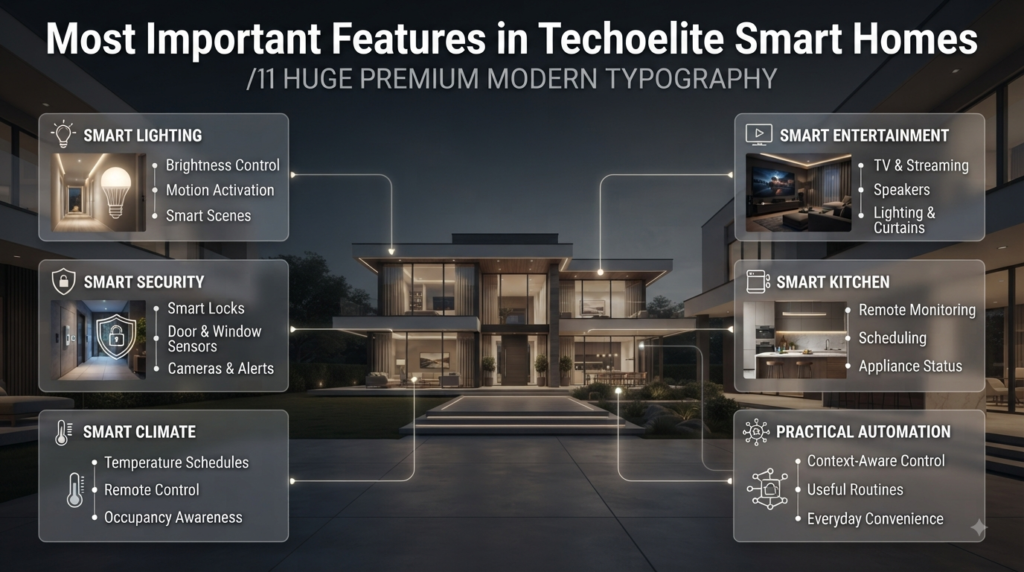
A complete smart-home system can include many technologies, but not all features provide equal value. The best choices depend on the property, household, budget, and lifestyle.
Smart Lighting
Smart lighting is often one of the easiest ways to experience the benefits of home automation.
Depending on the equipment, homeowners can control:
- Brightness
- On/off schedules
- Individual rooms
- Groups of lights
- Motion-activated lighting
- Scene-based lighting
- Outdoor lighting
- Remote access
Imagine entering a hallway late at night. Instead of turning on a bright ceiling fixture manually, a motion sensor could activate a softer light for a limited period.
During the day, the same sensor could remain inactive because natural light is already sufficient.
This is a small example, but it demonstrates an important principle: good automation reacts to context.
Smart lighting can also work closely with interior design. Lighting affects how colors, textures, furniture, artwork, and architectural details appear, so it should be considered during the design process rather than added as an afterthought.
For homeowners planning broader upgrades, a dedicated Paint Color resource can help when selecting wall colors that work with different lighting temperatures and brightness levels.
Smart Security
Security is another major reason homeowners consider intelligent technology.
A connected security setup can include:
- Smart locks
- Door sensors
- Window sensors
- Motion detectors
- Video doorbells
- Security cameras
- Alarm systems
- Mobile notifications
The main advantage is increased awareness.
If a door is opened unexpectedly, a compatible system may send an alert. If a camera detects activity, the homeowner may be able to review footage remotely. If a smart lock supports remote status checking, the homeowner can verify whether the entrance is secured.
However, smart security should never be treated as a replacement for sensible physical security.
Strong doors, appropriate locks, secure windows, outdoor lighting, privacy measures, and good household habits still matter.
⚠ Common Mistake: Installing cameras everywhere without considering privacy. More cameras do not automatically mean better security. Plan coverage around genuine security risks and limit access to people who actually need it.
Smart Climate Control
Heating and cooling have a direct effect on comfort and household energy consumption.
Smart climate technology can allow homeowners to create schedules, control temperatures remotely, use sensors, and adjust settings according to occupancy or time.
For example, a homeowner may prefer a cooler bedroom at night but doesn’t need the same temperature in an empty guest room during the afternoon.
A well-designed system can make these adjustments more convenient.
However, smart climate control should be compatible with the home’s existing HVAC equipment. Not every smart thermostat works with every system, particularly when wiring, voltage, zoning, or proprietary controls are involved.
Professional compatibility checks are worthwhile before purchasing equipment.
Smart Entertainment
Home entertainment can also benefit from automation.
A connected entertainment setup may combine:
- Television
- Streaming equipment
- Speakers
- Receivers
- Lighting
- Motorized curtains
- Home-theater controls
Instead of activating several devices separately, a “Movie Night” scene could dim the lights, close compatible blinds, turn on the television, select the appropriate input, and activate the sound system.
The best entertainment automation removes unnecessary steps.
It should not create another complicated interface that homeowners have to learn.
Smart Kitchen Technology
The kitchen is becoming increasingly connected as manufacturers add smart features to refrigerators, ovens, dishwashers, coffee makers, and other appliances.
Potential benefits include:
- Remote monitoring
- Scheduling
- Notifications
- Appliance status checks
- Energy information
- Automated routines
But the presence of an app does not automatically make an appliance better.
Before purchasing a connected appliance, ask whether the smart features solve a genuine problem.
If you rarely need remote access to your oven, for example, paying significantly more for connectivity may not provide meaningful value.
Smart Curtains and Window Treatments
Automated blinds and curtains can combine convenience, privacy, lighting control, and energy management.
A morning routine could gradually open curtains after sunrise. During the hottest part of the day, automated shades could close to reduce direct solar heat. In the evening, they could close automatically for privacy.
Window automation becomes particularly useful when integrated with lighting and climate controls.
This is another example of why a smart home should be designed as a system rather than a collection of unrelated products.
How Does a Techoelite Smart Home Work?
At a basic level, smart-home automation involves devices, sensors, communication networks, software, and rules.
A simplified example looks like this:
Sensor → Controller/App → Automation Rule → Device Action
For instance:
Motion detected → Check time → Activate hallway light → Turn light off after 60 seconds
Another example:
Front door locked → Check “Leaving Home” routine → Turn selected lights off → Adjust climate → Activate security
The exact technology depends on the products used. Some devices communicate directly, while others depend on a hub, bridge, local controller, or cloud service.
What Is a Smart Home Hub?
A smart-home hub can provide a central point for managing compatible devices and automation.
Its usefulness becomes more obvious as a system grows.
A homeowner might have:
- Smart lights
- Door sensors
- Motion sensors
- Smart locks
- Thermostats
- Blinds
- Speakers
Managing every device independently can become inconvenient. A compatible hub or integrated platform can help coordinate those systems.
However, not every home requires a dedicated hub. Some ecosystems allow devices to communicate through other methods.
The right choice depends on the equipment and the type of automation you want.
What Role Does Wi-Fi Play?
A reliable network is one of the foundations of a modern smart home.
Before installing numerous devices, evaluate:
- Router quality
- Wi-Fi coverage
- Dead zones
- Number of connected devices
- Internet reliability
- Network security
- Future expansion
A large home may require additional access points rather than relying on one router placed in a distant corner.
📌 Quick Tip: Don’t wait until dozens of smart devices are installed to discover that the Wi-Fi signal doesn’t reach important rooms.
What Are the Main Benefits of Techoelite Smart Homes?
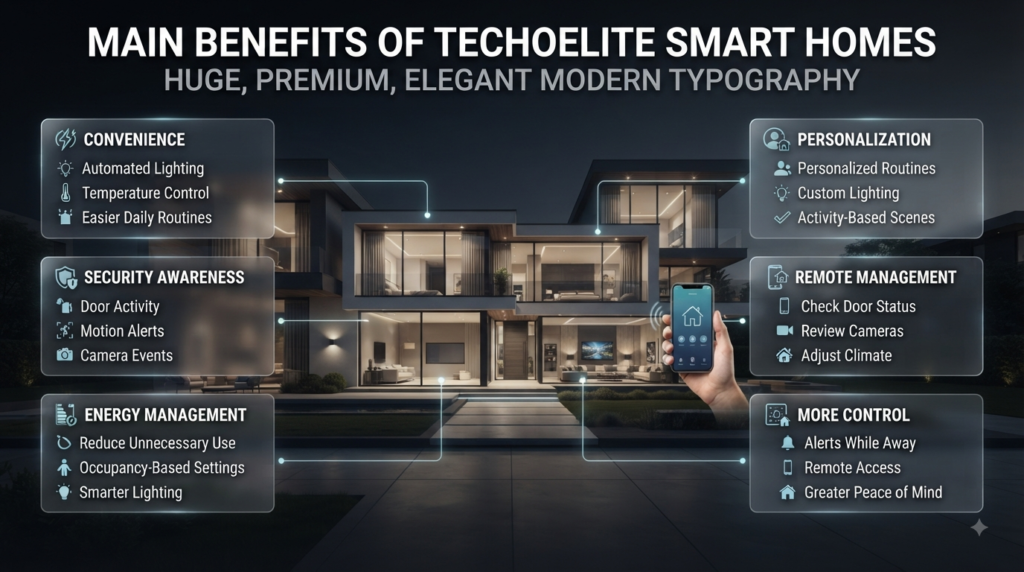
Convenience
The most obvious benefit is convenience.
Smart automation can reduce repetitive actions such as switching lights, checking locks, adjusting temperatures, and managing entertainment systems.
These actions may seem insignificant individually, but repeated dozens of times each week, they become excellent candidates for automation.
Better Security Awareness
Smart systems can make it easier to know what is happening at home when you’re away.
Depending on the equipment, you may receive alerts about:
- Door activity
- Motion
- Camera events
- Unusual access
- Alarm conditions
- Environmental changes
This doesn’t eliminate risk, but it can shorten the time between an event occurring and the homeowner becoming aware of it.
Energy Management
Automation can reduce unnecessary energy use by turning systems off or adjusting them when they aren’t needed.
Lighting is a straightforward example.
If lights frequently remain on in empty rooms, occupancy sensors or schedules can reduce waste.
Climate control can also benefit from occupancy-based settings.
However, smart technology is only one part of energy efficiency. Insulation, windows, HVAC efficiency, lighting efficiency, and household behavior remain important.
Homeowners looking at the wider picture can explore Energy-Efficient Homes for ideas that complement smart automation.
Personalization
A smart home can be configured around different people and routines.
One family member may prefer brighter morning lighting, while another may prefer a slower transition.
Similarly, entertainment scenes can be customized for different activities.
The objective is not to let technology control the homeowner. It is to give the homeowner more control over the environment.
Remote Management
Remote access can be valuable when you’re traveling.
Depending on the system, you may be able to:
- Check whether doors are locked
- Turn lights on
- Review cameras
- Adjust climate controls
- Receive alerts
- Check selected appliances
This can provide peace of mind without requiring someone to physically visit the property for simple checks.
Is a Techoelite Smart Home Worth the Investment?
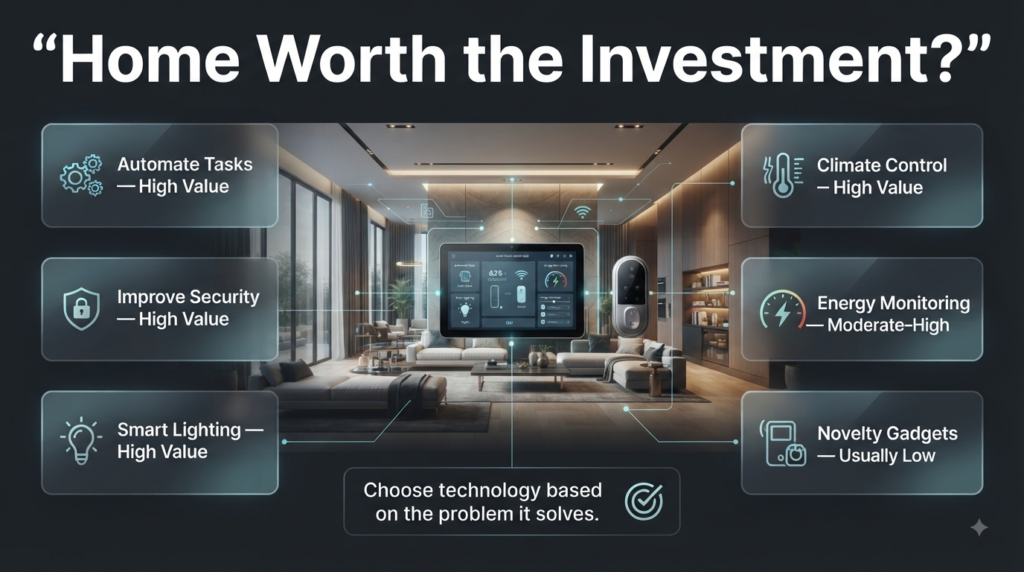
A smart home can be worth the investment when it addresses real needs.
It becomes less worthwhile when homeowners purchase products simply because they are fashionable.
| Goal | Potential Value |
|---|---|
| Automate repetitive tasks | High |
| Improve security awareness | High |
| Manage lighting | High |
| Improve climate control | High |
| Monitor energy use | Moderate to high |
| Add novelty gadgets | Usually low |
| Automate every household function | Often unnecessary |
A practical approach is to prioritize features based on frequency and impact.
If you repeatedly forget to turn off lights, smart lighting is useful.
If you frequently worry about whether you locked the front door, a smart lock may be more valuable.
If energy bills are a concern, climate and energy management may deserve priority.
The right system depends on the problem.
How Should You Plan a Techoelite Smart Home?
A successful smart home starts with planning.
Step 1: Identify the Problems
Walk through a normal day and identify frustrating or repetitive tasks.
Ask yourself:
- Which lights are often left on?
- Do I worry about security when away?
- Are some rooms too hot or too cold?
- Which appliances do I forget to turn off?
- Which daily routines require too many steps?
- Where would automation genuinely save time?
Write these down before buying anything.
Step 2: Prioritize Your Goals
Choose your most important category.
You might choose:
Security-first:
Smart locks, sensors, cameras, alerts
Comfort-first:
Lighting, climate, curtains
Energy-first:
Lighting controls, energy monitoring, climate automation
Convenience-first:
Scenes, voice controls, smart appliances
This prevents unnecessary spending.
Step 3: Choose Compatible Technology
Compatibility should be checked before purchase.
Consider:
- Mobile platform
- Voice assistant
- Communication protocol
- Hub requirements
- Existing devices
- Wi-Fi requirements
- Software support
- Future expansion
A cheap device that cannot communicate with the rest of your system may cost more in the long run.
Step 4: Plan the Physical Installation
Smart-home planning is not only about software.
Electrical outlets, wiring, sensor locations, switches, lighting positions, speakers, cameras, network equipment, and access points all affect the final result.
This is where smart technology overlaps with broader Home Improvement planning.
If you’re renovating, plan smart-home infrastructure before walls are closed or ceilings are finished.
Running cables and positioning electrical components during construction is usually easier than retrofitting everything later.
Step 5: Build the Network
Reliable networking should be treated as infrastructure.
Check coverage throughout the home rather than only next to the router.
For larger properties, consider whether additional access points or a more structured network would improve reliability.
Secure the network with strong credentials and keep network equipment updated.
Step 6: Install the Most Important Devices First
Don’t automate the entire property immediately.
Start with a few high-value functions.
For example:
- Smart lighting
- Door sensors
- Smart lock
- Climate control
- Selected automation scenes
Once those systems are reliable, expand.
Step 7: Test Your Automations
Test each routine repeatedly.
For every important automation, ask:
- What happens if Wi-Fi stops?
- What happens if the power goes out?
- What happens if a sensor battery dies?
- Can the device still be operated manually?
- What happens if the phone is unavailable?
⭐ Expert Tip: Essential systems should always have a fallback. Smart technology should improve resilience and convenience, not create a new single point of failure.
How Can Smart Technology Work With Interior Design?
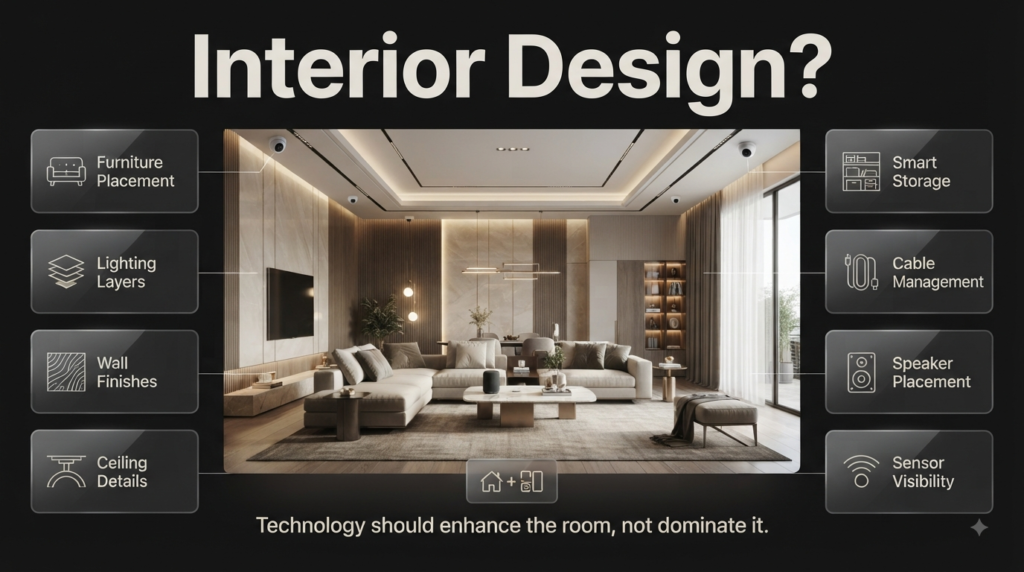
A smart home should still feel like a home.
Technology becomes visually distracting when switches, screens, cables, speakers, sensors, and devices are installed without considering the surrounding design.
Good integration starts with the room.
Think about:
- Furniture placement
- Lighting layers
- Wall finishes
- Ceiling details
- Storage
- Cable management
- Speaker placement
- Sensor visibility
- Switch locations
- Camera positioning
For broader Home Styling ideas, homeowners can consider how technology can be integrated without making rooms feel overly technical.
A smart speaker, for example, may be positioned where it provides good sound without becoming the visual focus of the room.
Similarly, smart switches can be selected to complement the home’s hardware and finishes.
Should Smart Homes Follow a Specific Interior Style?
They can.
Smart technology doesn’t force a particular design style.
It can work with:
- Minimalist interiors
- Contemporary interiors
- Scandinavian interiors
- Japandi spaces
- Traditional homes
- Statement interiors
- Natural-material interiors
For homeowners developing a complete aesthetic, Interior Design Styles can help with the broader visual direction.
The key is consistency.
How Does Minimalist Design Work With Smart Homes?
Minimalism and smart-home technology can complement each other naturally.
Minimalist interiors prioritize clean lines, useful objects, visual calm, and limited clutter.
Smart technology can support those principles when controls, wiring, speakers, and equipment are integrated discreetly.
For example, instead of several visible switches and separate control panels, a carefully planned system may reduce unnecessary physical clutter.
You can explore Minimalist Interior Design for ideas on maintaining a clean visual environment while still incorporating modern functionality.
The important warning is not to interpret minimalism as “remove everything.”
A good minimalist smart home keeps the technology that provides genuine value and removes unnecessary visual noise.
Can Contemporary Interior Design Complement Smart Technology?
Yes. Contemporary interiors often work especially well with integrated technology because both approaches can emphasize clean geometry, practical functionality, and modern materials.
A smart-home installation can be designed around:
- Recessed lighting
- Clean switch plates
- Hidden wiring
- Integrated speakers
- Motorized window treatments
- Simple control interfaces
For broader inspiration, Contemporary Interior Design can help homeowners think about how technology and modern interiors can share the same visual language.
The goal is not to make technology obvious. It should feel like part of the architecture.
Can Japandi Design Work With Smart Homes?
Japandi combines Japanese simplicity with Scandinavian warmth, making it particularly suitable for homeowners who want technology without visual clutter.
Natural textures, restrained decoration, functional furniture, soft lighting, and uncluttered layouts can work beautifully alongside discreet automation.
A smart lighting system can be especially valuable in this style because different lighting levels can create warmth without requiring numerous visible fixtures.
For inspiration, Japandi Interior Design offers a useful reference for combining simplicity, natural materials, and comfortable functionality.
What About Natural Materials?
Technology does not require a home to look metallic or futuristic.
Natural wood, stone, textiles, and warm finishes can create a balanced environment around connected devices.
For example, smart lighting can highlight natural wood surfaces without requiring visible technology.
Homeowners interested in this approach can explore Natural Wood Interior ideas to understand how warm materials can balance modern technology.
The best smart homes often hide complexity behind simple, tactile surroundings.
Can Scandinavian Interiors Include Smart Technology?
Scandinavian design emphasizes simplicity, functionality, natural light, practical furniture, and comfortable living.
These principles work well with smart-home automation because technology can remove unnecessary steps while preserving a calm environment.
For example, automated lighting can support changing daylight conditions, while smart heating or climate controls can improve comfort.
Scandinavian Interior Design can provide additional inspiration for homeowners who want a functional but visually relaxed smart home.
How Can Decorative Finishes Work Around Smart Features?
Walls, ceilings, built-ins, and other architectural surfaces need to be considered when planning sensors, lighting, speakers, displays, and control panels.
A smart-home installation should ideally look intentional.
Poorly placed devices can interrupt a carefully designed wall.
Thoughtful placement can make them almost disappear.
For ideas about integrating surface treatments into the wider design, Decorative Finishes can help homeowners think about how finishes and technology can coexist.
What About Ceiling-Mounted Technology?
Ceilings may contain:
- Recessed lights
- Speakers
- Sensors
- Cameras
- Smoke detectors
- Ventilation equipment
These components should be positioned before final ceiling work whenever possible.
Planning them together avoids a common problem: adding devices after the ceiling design is finished and creating an uneven visual result.
Can DIY Projects Be Part of a Smart Home?
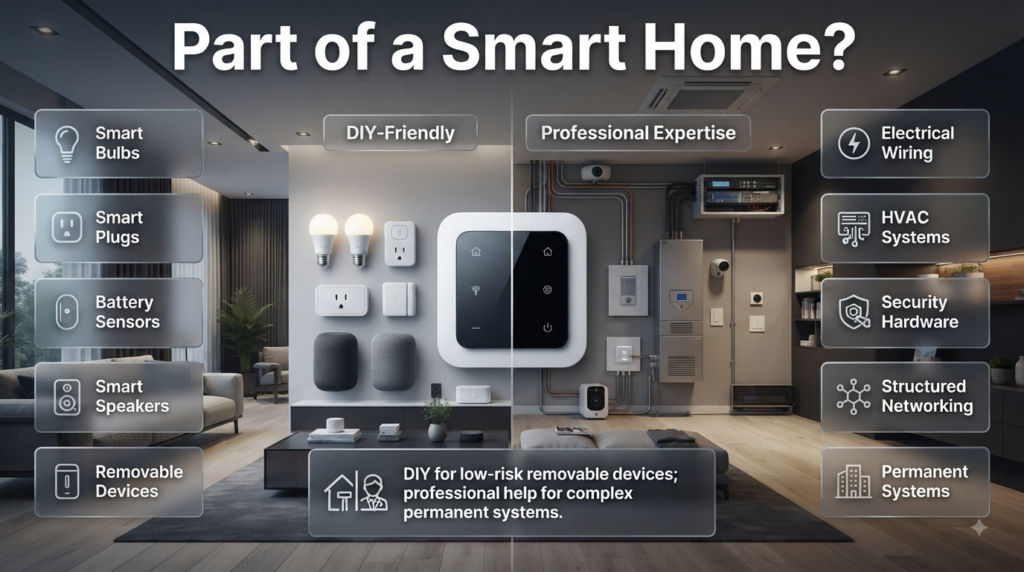
Some smart-home projects are suitable for DIY installation.
Examples can include:
- Smart bulbs
- Smart plugs
- Battery-powered sensors
- Some smart speakers
- Certain removable devices
However, electrical wiring, HVAC modifications, security hardware, structured networking, and other complex installations may require appropriate professional expertise.
A useful rule is:
DIY for low-risk removable devices; professional help for complex permanent systems.
Homeowners who enjoy hands-on improvements can also explore DIY Home Projects for ideas that can complement a smart-home upgrade.
What DIY Home Decor Can Improve a Smart Home?
Not every improvement requires expensive technology.
Simple decorative projects can make a connected home feel more personal.
Examples include:
- Updating furniture
- Creating storage for devices
- Improving cable concealment
- Building decorative shelving
- Refinishing old pieces
- Creating custom display areas
For creative ideas, DIY Home Decor Crafts can complement a smart-home project without adding unnecessary technology.
The principle is important: not every problem needs a smart device.
Sometimes a better storage solution is more effective than another connected gadget.
What Are the Most Common Smart Home Mistakes?
Buying Devices Before Choosing a System
This is one of the most common mistakes.
People buy products because individual reviews are positive without checking whether those products integrate properly.
Why it happens: Individual products are easier to compare than complete systems.
Why it hurts: You may end up managing several apps and limited automation.
How to avoid it: Choose your ecosystem and compatibility requirements first.
Automating Everything
Automation should reduce effort, not create confusion.
If a complicated routine repeatedly activates at the wrong time, the homeowner may eventually stop using it.
Better approach: Automate predictable, repetitive tasks first.
Ignoring Network Quality
A smart device is only as reliable as its communication environment.
Weak Wi-Fi can cause delays, dropped connections, or unreliable automation.
Better approach: Plan network coverage before expanding the device count.
Forgetting About Privacy
Connected devices can collect sensitive information.
Cameras, microphones, locks, and sensors deserve particular attention.
Better approach: Use strong passwords, multi-factor authentication where available, software updates, and limited account access.
Choosing the Cheapest Device
The lowest upfront cost can become expensive if the product has poor software support or fails quickly.
Look at:
- Warranty
- Reliability
- Compatibility
- Update policy
- App quality
- Replacement availability
Forgetting Manual Controls
Critical functions should not depend entirely on automation.
A light should still be usable manually. A door should have an appropriate backup method. Essential equipment should remain practical during outages.
Ignoring Future Expansion
You may start with five devices and eventually want fifty.
Choose an approach that can grow with your needs.
How Can Furniture and Smart Technology Work Together?
Furniture placement affects the usefulness of many smart devices.
Speakers need suitable acoustic positioning. Cameras need clear views. Motion sensors need appropriate coverage. Smart lighting controls should be accessible.
Furniture can also hide technology.
For example, a media console can organize entertainment equipment and cables, while built-in cabinetry can keep networking equipment visually discreet.
If an existing piece of furniture doesn’t fit the new design, Furniture Makeovers can provide inspiration for updating it rather than replacing it immediately.
This approach can reduce waste while keeping the interior visually cohesive.
Should a Smart Home Look Futuristic?
Not necessarily.
A smart home can look traditional, warm, minimalist, luxurious, rustic, contemporary, or Scandinavian.
The technology works behind the scenes.
In fact, many homeowners prefer smart systems that are almost invisible.
This is particularly important in spaces designed around comfort rather than technology.
A home should still feel welcoming when the screens are off.
How Can Statement Interiors Use Smart Technology?
Statement interiors often use bold furniture, artwork, lighting, textures, colors, or architectural elements to create a strong visual identity.
Technology should support that identity rather than compete with it.
For example, automated lighting can highlight artwork or architectural details without making the lighting equipment itself the focus.
Statement Interiors can provide inspiration for creating visually distinctive spaces while keeping technology integrated into the overall concept.
How Can Paint and Lighting Work Together?
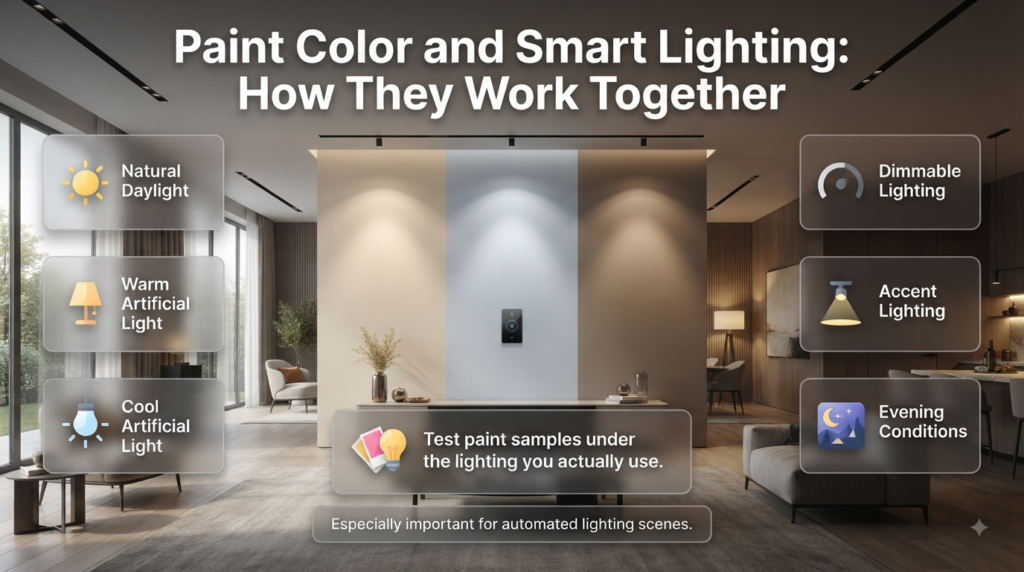
Paint color and smart lighting influence each other.
A wall may look different under warm evening light compared with bright daylight or cooler task lighting.
When choosing paint for a smart home, test samples under the lighting conditions you actually expect to use.
Consider:
- Natural daylight
- Warm artificial light
- Cool artificial light
- Dimmable lighting
- Accent lighting
- Evening conditions
This is particularly important when creating automated lighting scenes.
A wall color that looks perfect under one setting may appear noticeably different under another.
Can Smart Technology Improve Home Design?
Yes, but only when technology is integrated during the planning stage.
Smart technology can influence:
- Lighting design
- Furniture arrangement
- Ceiling plans
- Electrical layouts
- Storage
- Window treatments
- Security planning
- Energy management
This means smart-home planning should ideally happen before major renovation work begins.
A homeowner who waits until the end may have fewer options for concealed wiring and integrated equipment.
What Is the Best Way to Create Smart Home Scenes?
A scene should represent an activity rather than a random collection of commands.
Good examples include:
Good Morning
- Gradually increase bedroom lighting
- Adjust climate settings
- Open compatible curtains
- Start selected equipment
Leaving Home
- Turn selected lights off
- Lock doors
- Activate security
- Adjust climate settings
Movie Night
- Dim lights
- Close curtains
- Activate entertainment
- Adjust selected lighting
Good Night
- Turn off main lights
- Lock doors
- Activate security
- Set bedroom conditions
The exact actions depend on your equipment.
The important point is that each scene should solve a recognizable household situation.
What Should You Automate First?
If you’re starting from scratch, prioritize based on frequency and importance.
| Priority | Suggested First Automation | Why |
| 1 | Lighting | Easy and immediately useful |
| 2 | Security sensors | Improves awareness |
| 3 | Climate | Comfort and potential efficiency |
| 4 | Smart lock | Convenience and access management |
| 5 | Curtains | Comfort and privacy |
| 6 | Entertainment | Lifestyle convenience |
| 7 | Smart appliances | Useful when specific needs exist |
This isn’t a strict universal order. Security should come first for a homeowner whose primary concern is property protection, for example.
The best first automation is the one that solves your biggest problem.
How Should You Maintain a Smart Home?
Smart homes require maintenance, although much of it is straightforward.
Check Device Updates
Firmware and app updates can improve reliability and security.
Replace Batteries
Battery-powered sensors and locks need periodic replacement.
Review Permissions
Remove old users and devices that no longer need access.
Check Network Performance
If devices become unreliable, don’t immediately replace them. The network may be the problem.
Document Important Settings
For larger systems, keep a basic record of:
- Device names
- Locations
- Network information
- Automation rules
- Account ownership
- Warranty details
This makes troubleshooting easier.
What Happens When the Internet Goes Down?
This depends entirely on the system.
Some devices may continue operating locally. Others may lose remote features. Cloud-dependent functions may stop working until connectivity returns.
This is why homeowners should understand the difference between:
- Local automation
- Cloud automation
- Remote access
- Internet-dependent services
For important systems, local fallback is preferable where practical.
A smart home should degrade gracefully rather than becoming completely unusable.
What Happens During a Power Outage?
Again, the answer depends on the equipment.
Some devices may stop operating immediately. Battery-backed security equipment, network equipment, or locks may continue working for a limited period.
If resilience is important, consider backup power for essential components.
Don’t assume a smart device automatically has outage protection simply because it is marketed as “smart.”
How Secure Should a Smart Home Be?
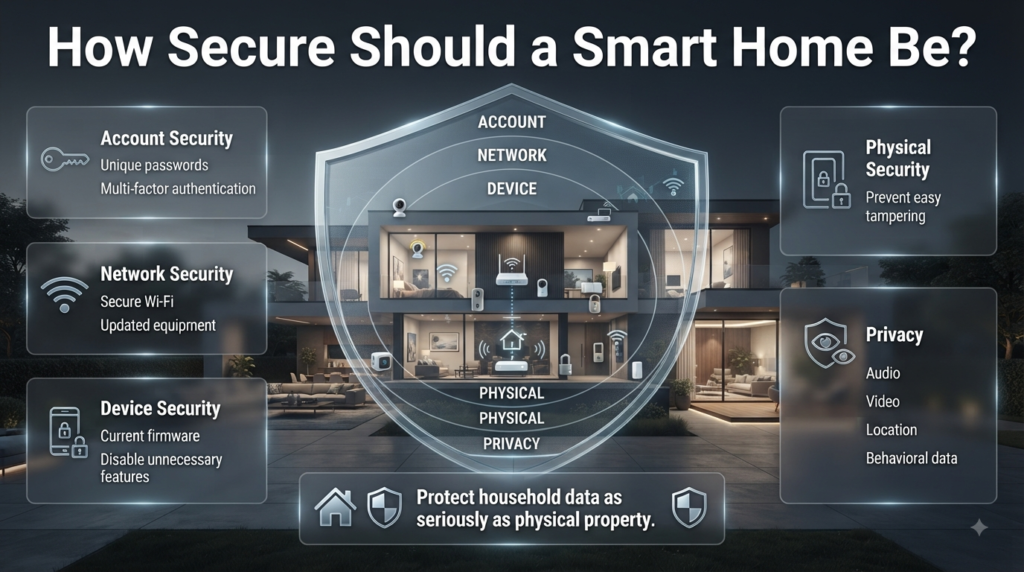
Security should be designed at several levels.
Account Security
Use unique passwords and multi-factor authentication where available.
Network Security
Use secure Wi-Fi and updated networking equipment.
Device Security
Keep firmware current and disable unnecessary features.
Physical Security
Install devices where they cannot easily be tampered with.
Privacy
Think carefully about which devices collect audio, video, location, or behavioral information.
A smart home contains valuable data about household routines. Protecting that information should be treated as seriously as protecting the physical property.
What Should Beginners Avoid?
Beginners should avoid building a system based entirely on trends.
A product may be popular online but still be unsuitable for your home.
Avoid:
- Buying incompatible devices
- Installing too many brands
- Ignoring network capacity
- Automating critical functions without fallback
- Forgetting software support
- Ignoring privacy
- Buying features you won’t use
- Starting a renovation without planning wiring
The best smart-home investment is rarely the most complicated one.
How Can Smart Homes Support a More Comfortable Lifestyle?
Comfort is one of the most underrated benefits of automation.
Think about how your environment changes throughout a normal day.
Morning may require brighter light and cooler temperatures.
Afternoon may require shade and reduced cooling in unused areas.
Evening may benefit from warmer lighting and more privacy.
Night may require minimal lighting and stronger security settings.
Smart automation can coordinate those changes.
The result is not simply a “high-tech home.” It is a home that responds more naturally to the rhythm of daily life.
What Do Experts Recommend When Planning Techoelite Smart Homes?
The strongest professional recommendation is simple:
Start with the experience, then choose the technology.
Don’t begin by asking, “Which smart devices should I buy?”
Ask:
“What do I want my home to do better?”
If the answer is better security, build around security.
If the answer is lower energy waste, focus on lighting, climate, and monitoring.
If the answer is convenience, focus on routines.
If the answer is better entertainment, integrate audio, video, lighting, and curtains.
A second recommendation is to plan infrastructure early.
Electrical layouts, network points, lighting circuits, HVAC controls, and equipment locations become harder to change after construction is complete.
A third recommendation is to keep the system understandable.
If nobody in the household understands how an automation works, it may become a source of frustration.
Good smart-home design is therefore both sophisticated and simple.
Is Techoelite compatible with Alexa, Google Home, and Apple HomeKit?
Techoelite’s published smart-home information specifically describes control through Amazon Alexa and Google Assistant, allowing homeowners to use voice commands alongside smartphone or tablet controls. The system is presented as using a central hub to connect compatible smart devices, allowing functions such as lighting, security, and other home systems to be managed together.
For Apple HomeKit, however, it is important not to assume compatibility without checking the exact device or installation. Techoelite’s available published material does not clearly confirm that every Techoelite smart-home product or system is officially HomeKit-compatible. Compatibility can also vary between individual devices, hubs, bridges, and software versions.
Before purchasing, check the exact model and look for official support for:
Amazon Alexa
Google Home/Google Assistant
Apple Home/HomeKit
Matter, where applicable
Required hubs or bridges
Voice-control features
Local versus cloud-based control
This is particularly important if your household already uses one ecosystem heavily. For example, an Apple-focused household may want to confirm Apple Home compatibility before buying several devices, while an Alexa or Google Home user should verify that all planned devices can be added to the same system.
In short: Techoelite’s own material confirms Alexa and Google Assistant integration, while Apple HomeKit compatibility should be verified for the specific products or system before purchase.
How does Techoelite ensure user privacy and data security?
Privacy is an important consideration in any smart home because connected devices can potentially handle information about your home, routines, security events, and device usage. Cameras, smart locks, sensors, microphones, and other connected products can create a significant amount of personal data.
Techoelite’s published smart-home article focuses primarily on convenience, security, energy efficiency, and device integration; it does not provide enough detailed technical information to independently confirm specific Techoelite encryption standards, data-retention policies, or security architecture. Therefore, it’s better not to claim that a particular encryption method or privacy certification is used unless Techoelite documents it for the specific system.
For a secure Techoelite smart-home setup, homeowners should pay attention to several layers of protection.
First, secure the account. Use a strong, unique password and enable multi-factor authentication whenever the relevant service provides it. Avoid sharing one account with everyone in the household if the system allows separate user permissions.
Second, protect the home network. Smart devices communicate through your network, so your router should use strong credentials and current security settings. Keep networking equipment updated and avoid leaving unnecessary remote-access features enabled.
Third, keep devices updated. Firmware and software updates can address bugs and security weaknesses. A smart-home system should be maintained just like a computer or smartphone.
Fourth, control access carefully. A family member may need access to lighting but not security-camera administration. Where the platform supports different permission levels, use them.
Fifth, think about privacy before installing cameras and microphones. Place cameras only where they serve a legitimate purpose and review who can access recordings or live feeds.
Smart-home security is also an industry-wide concern. Research has highlighted that connected-home devices can create privacy and security risks because they collect information about activities inside the home.
So, the safest approach is not simply to ask whether a smart-home brand is “secure.” Ask what data the specific device collects, where that data is processed, who can access it, how accounts are protected, and what happens when the device is no longer supported.
Can Techoelite smart home systems help reduce monthly energy bills?
Yes, they can help reduce unnecessary energy consumption, although the amount saved will vary from one household to another.
Techoelite’s published smart-home information specifically highlights energy management, smart thermostats, and energy-efficient appliances as part of its smart-home concept. It states that these technologies can help reduce energy consumption and potentially lower utility costs.
The biggest advantage comes from preventing energy waste.
For example, imagine a home where several lights remain on in empty rooms every evening. Smart lighting can use schedules, sensors, or automation to switch those lights off when they’re no longer needed.
Climate control can provide another opportunity. If the house is empty for several hours, a compatible smart thermostat or climate system may be able to adjust the temperature rather than maintaining the same setting throughout the day.
Smart technology can also help homeowners understand their habits.
A practical energy-saving setup might include:
Motion-based lighting
Scheduled outdoor lighting
Smart thermostatic controls
Occupancy-based climate adjustments
Energy monitoring
Efficient appliances
Automated blinds or curtains
Scheduled operation of selected equipment
However, there’s an important limitation: smart technology doesn’t automatically make an inefficient house efficient.
If a property has poor insulation, inefficient windows, an aging HVAC system, or inefficient appliances, installing smart controls alone won’t solve those problems.
The best results come from combining automation with broader efficiency improvements.
For example:
Efficient equipment + good insulation + sensible temperature settings + smart automation = stronger energy-management strategy
Another important point is that homeowners shouldn’t create aggressive automation purely to save energy if it makes the home uncomfortable. The goal is to eliminate unnecessary waste while maintaining a practical living environment.
So yes, Techoelite-style smart-home automation can contribute to lower monthly energy costs, but actual savings depend on the property’s equipment, household behavior, climate, automation settings, and energy usage patterns.
What happens to Techoelite devices during a power outage or internet failure?
This depends on the specific device and how the smart-home system is designed.
A power outage and an internet outage are not the same thing.
If the internet goes down while electricity and the local network remain available, some smart-home devices may continue performing local functions. Other devices may lose cloud-based features such as remote access, voice commands, notifications, or online services.
If the power goes out, the situation is more serious because devices that depend on mains electricity may shut down completely unless they have battery backup or another power source.
A typical smart-home setup may behave roughly like this:
Situation
What may happen
Internet unavailable
Remote/cloud functions may stop
Wi-Fi/router failure
Network-dependent devices may become inaccessible
Power outage
Most mains-powered devices stop
Battery-powered sensor
May continue operating
Battery-backed security equipment
May continue for a limited period
Physical light switch
May continue if the electrical supply remains active
Local automation hub
Some routines may continue without internet
The exact behavior depends on the individual hardware and system architecture.
For example, some smart-home systems store automation rules locally. Those systems can potentially continue running certain routines even if the wider internet connection disappears. Cloud-dependent automations may not work until connectivity returns.
Recent smart-home guidance similarly notes that internet loss does not necessarily stop every smart device; local processing, hubs, and certain communication technologies can allow some functions to continue. A complete power outage is generally more disruptive because routers, hubs, cameras, and other mains-powered equipment lose electricity.
How can you make a Techoelite smart home more reliable during outages?
There are several practical steps.
Keep manual controls.
Essential lights, doors, and other important functions should have a sensible physical fallback wherever possible.
Consider backup power.
A UPS or other suitable backup solution can help keep critical networking or smart-home equipment running temporarily.
Choose devices with local control when possible.
Local processing can reduce dependence on external cloud services.
Test your system.
Don’t wait for a real emergency. Disconnect the internet while leaving the router powered and see which features continue working. If possible and safe, also understand what happens during a power interruption.
Know which features depend on the cloud.
Remote notifications and voice assistants may stop working during certain outages even if the underlying device remains functional.
The important lesson is that a smart home should be designed to fail gracefully. Losing internet access should ideally mean losing convenience features rather than losing control of essential parts of the house.
Conclusion
Techoelite Smart Homes represent a practical way to make everyday living more convenient, secure, comfortable, and energy-conscious. The real value isn’t simply having smart devices throughout the house; it’s how those devices work together to support your daily routines. From automated lighting and smart security to climate control, energy management, entertainment, and connected appliances, the right system can remove repetitive tasks while giving homeowners greater control.
Before investing, it’s important to think beyond individual gadgets. Check device compatibility, network reliability, privacy and security features, backup options, and long-term support. Alexa and Google Assistant integration can make voice control convenient, while Apple HomeKit compatibility should be confirmed for the specific products you plan to install.
A well-planned smart home should also remain practical when technology fails. Manual controls, reliable networking, suitable backup power, and simple automation routines can prevent a small technical problem from becoming a major inconvenience.
Ultimately, the best Techoelite smart home isn’t the one with the most devices. It’s the one designed around the homeowner’s real needs. Start with the problems you want to solve, choose compatible technology, integrate it thoughtfully with your home’s design, and expand gradually. When technology works quietly in the background instead of demanding constant attention, a smart home can become a genuinely better place to live.
Leave a Reply