
Introduction
Automated Climate Control for Different Rooms | A home can have one HVAC system and still feel completely different from room to room. The bedroom may feel too warm at night, the home office may become uncomfortable in the afternoon, while the living room might already be cool enough. When every room is treated exactly the same, comfort becomes difficult to manage and energy can be wasted conditioning spaces that nobody is using.
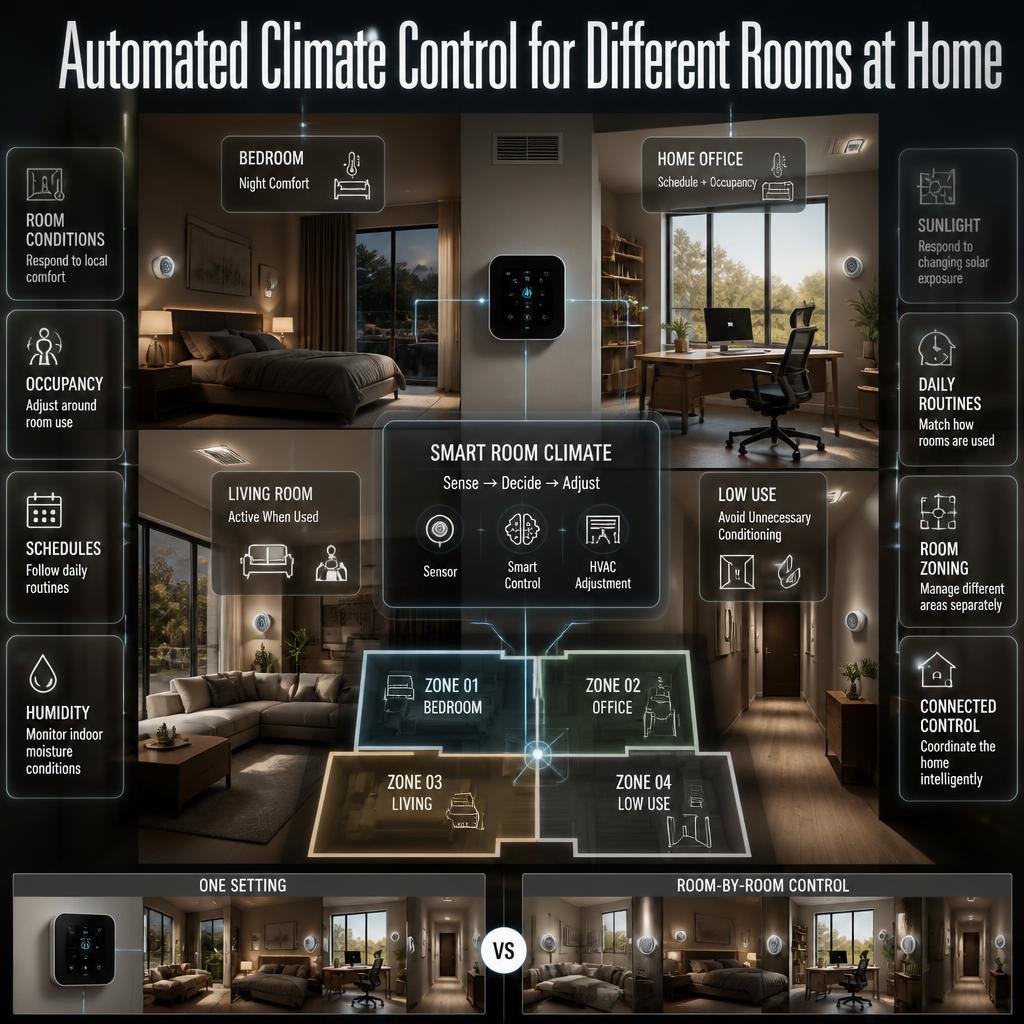
This is where automated climate control for different rooms becomes useful. Instead of relying on one thermostat and one temperature setting for the entire home, smart climate systems can respond to individual room conditions, occupancy, schedules, humidity, sunlight, and daily routines.
For homeowners planning a more comfortable and connected property, DesignMode24 Interior Design provides a useful starting point for thinking about the relationship between technology, room planning, comfort, and overall home design.
In this guide, you’ll learn how automated room climate control works, which rooms benefit most, what sensors and equipment are useful, how zoning works, what mistakes to avoid, and how to plan a system that feels natural rather than overly complicated.
What Is Automated Climate Control for Different Rooms?
Automated climate control for different rooms is a system that manages temperature and, in some cases, humidity, airflow, ventilation, and other indoor conditions according to the needs of individual rooms or zones.
Instead of saying, “The whole house should be 22°C,” a smart system can recognize that the bedroom is occupied at night, the office is occupied during working hours, and the guest room is empty.
A basic system may use a smart thermostat and remote temperature sensors. A more advanced setup can include motorized duct dampers, multiple HVAC units, occupancy sensors, humidity sensors, smart vents, schedules, and a central home automation platform.
The important point is that automation isn’t simply remote control. A genuinely useful automated climate system makes decisions based on conditions and routines so the homeowner doesn’t have to constantly adjust settings.
How Does Room-by-Room Climate Automation Work?
A typical system follows a simple process:
Sensors → Controller → HVAC equipment → Room → Sensors
The sensor measures the room.
The controller compares the measurement with the desired condition.
The HVAC equipment responds.
The room changes.
The sensor measures the new condition again.
For example, imagine a bedroom that is scheduled for nighttime comfort. If the room becomes warmer than the selected target, the system can respond according to its programming.
More sophisticated systems can also consider:
- Occupancy
- Time of day
- Humidity
- Outdoor conditions
- Sun exposure
- Room temperature
- User schedules
- HVAC operating status
- Air-quality information
This creates a feedback loop rather than a simple on-and-off command.
Why Is Automated Climate Control Useful in Modern Homes?
The biggest problem with a single thermostat is that a house isn’t thermally uniform.
Rooms can have different:
- Window sizes
- Sun exposure
- Ceiling heights
- Insulation levels
- Occupancy patterns
- Appliance loads
- Furniture arrangements
- Ventilation requirements
- Comfort preferences
A south- or west-facing room can become significantly warmer when direct sunlight enters through large windows. An internal room without exterior walls may behave very differently.
A kitchen also has a different heat profile from a bedroom because cooking appliances create additional heat.
A home office may be comfortable in the morning but warm in the afternoon because of sunlight and computers.
This is why room-specific automation can be more practical than forcing every area to follow one identical schedule.
For homeowners approaching climate automation as part of a wider renovation, Home Improvement can provide broader context about planning upgrades around comfort, functionality, and long-term use.
What Is the Difference Between a Smart Thermostat and Room-by-Room Climate Control?
These terms are often used interchangeably, but they’re not exactly the same.
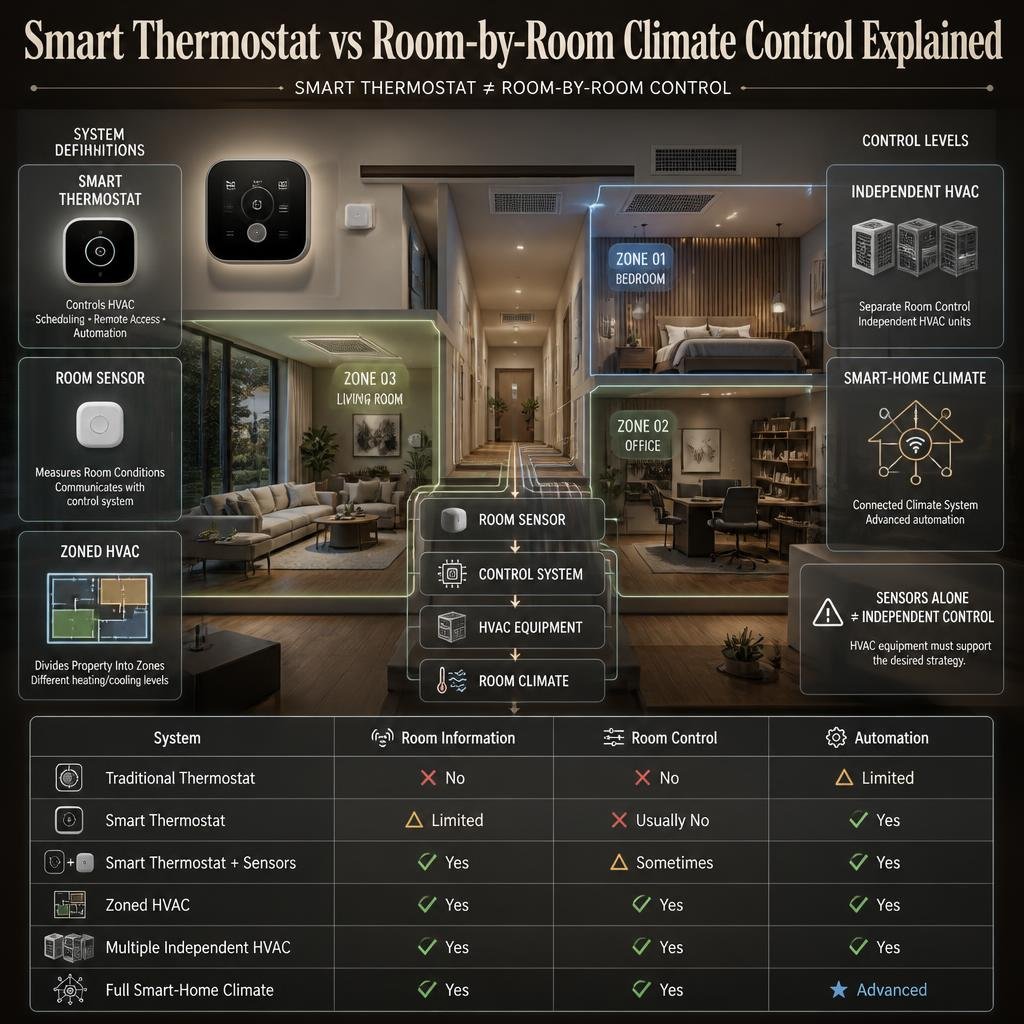
A smart thermostat generally controls an HVAC system while adding features such as scheduling, remote access, learning, and automation.
A room sensor measures conditions in a particular room and communicates that information to the control system.
A zoned HVAC system actually divides the property into separate areas that can receive different levels of heating or cooling.
Here’s a simple comparison:
| System | Individual room information | Independent room control | Automation |
|---|---|---|---|
| Traditional thermostat | No | No | Limited |
| Smart thermostat | Limited | Usually no | Yes |
| Smart thermostat + sensors | Yes | Sometimes | Yes |
| Zoned HVAC | Yes | Yes | Yes |
| Multiple independent HVAC units | Yes | Yes | Yes |
| Full smart-home climate system | Yes | Yes | Advanced |
This distinction matters because buying several smart sensors doesn’t automatically mean every room can be independently cooled or heated.
The HVAC equipment must also support the desired control strategy.
How Can You Control Different Rooms Automatically?
The most practical approach is to divide rooms according to how they’re used rather than automatically creating a separate zone for every room.
A useful home might have:
- Sleeping zone
- Living zone
- Work zone
- Kitchen zone
- Guest zone
- Low-use zone
The exact arrangement depends on the floor plan.
Two bedrooms with similar schedules may not require completely independent systems. On the other hand, a bedroom that receives afternoon sunlight may benefit from different control than a shaded bedroom.
The goal isn’t maximum complexity.
The goal is meaningful control where it actually improves comfort.
Automated Climate Control for Bedrooms
Bedrooms are among the best candidates for room-based climate automation because their occupancy patterns are predictable.
Most people don’t use their bedrooms continuously throughout the day. They may spend most of the daytime elsewhere and use the bedroom primarily in the evening and overnight.
A practical bedroom schedule might look like:
Daytime: Energy-saving setting
Before bedtime: Gradual comfort adjustment
Overnight: Stable temperature
Morning: Moderate adjustment
Daytime again: Reduced conditioning
The exact temperature depends on the occupants, climate, HVAC equipment, humidity, bedding, and personal preference.
Why Bedroom Sensors Matter
A central hallway thermostat may say the home is comfortable while the bedroom remains too warm.
A bedroom sensor can provide more useful information because it measures the environment where the occupants are actually sleeping.
However, sensor placement is critical.
Don’t place the sensor:
- Directly above an air vent
- Behind a curtain
- Next to a window
- Beside a lamp
- Above an electronic device
- In direct sunlight
- Behind a large piece of furniture
The sensor should represent the room’s general occupied environment.
For a broader discussion of how bedroom dimensions, furniture placement, circulation, and functional planning affect the space, see Bedroom Planning and Layout.
💡 Pro Tip: A stable bedroom temperature is usually more useful than constantly changing the setting by several degrees. Build a simple schedule first and adjust it after observing how the room actually behaves.
How Should Climate Automation Work in a Living Room?
Living rooms typically have changing occupancy throughout the day.
A family might use the room:
- Before work and school
- In the afternoon
- During evening relaxation
- On weekends
- When entertaining guests
This makes occupancy-based automation particularly useful.
A smart system can maintain a lower-energy setting while the room is empty and return to a comfort schedule around expected usage.
However, occupancy detection shouldn’t necessarily trigger an immediate HVAC change every time someone walks out of the room.
Imagine someone goes into the kitchen for five minutes. Turning the cooling system off immediately may create unnecessary cycling.
A better system can use:
- Occupancy delays
- Minimum run times
- Temperature ranges
- Scheduled comfort periods
- Vacancy periods
This creates smoother operation.
What About a Home Office?
Home offices have a major advantage for automation: their schedules are often predictable.
Someone working from home may need comfortable conditions from 8 AM to 5 PM but have no reason to maintain the same conditions overnight.
A smart schedule can pre-condition the room before work begins.
For example:
- The system detects or expects office use.
- The room begins moving toward the preferred condition.
- The office maintains comfort during working hours.
- A break or absence can trigger a modest setback.
- The system returns to normal when work resumes.
- After working hours, the room enters an energy-saving mode.
This approach is more practical than simply leaving the air conditioner running all day.
The room’s physical design also matters. A desk beside a large sunny window may experience more heat gain than a desk positioned away from direct sunlight.
How Should Automated Climate Control Work in the Kitchen?
The kitchen is one of the more challenging rooms because heat can change rapidly.
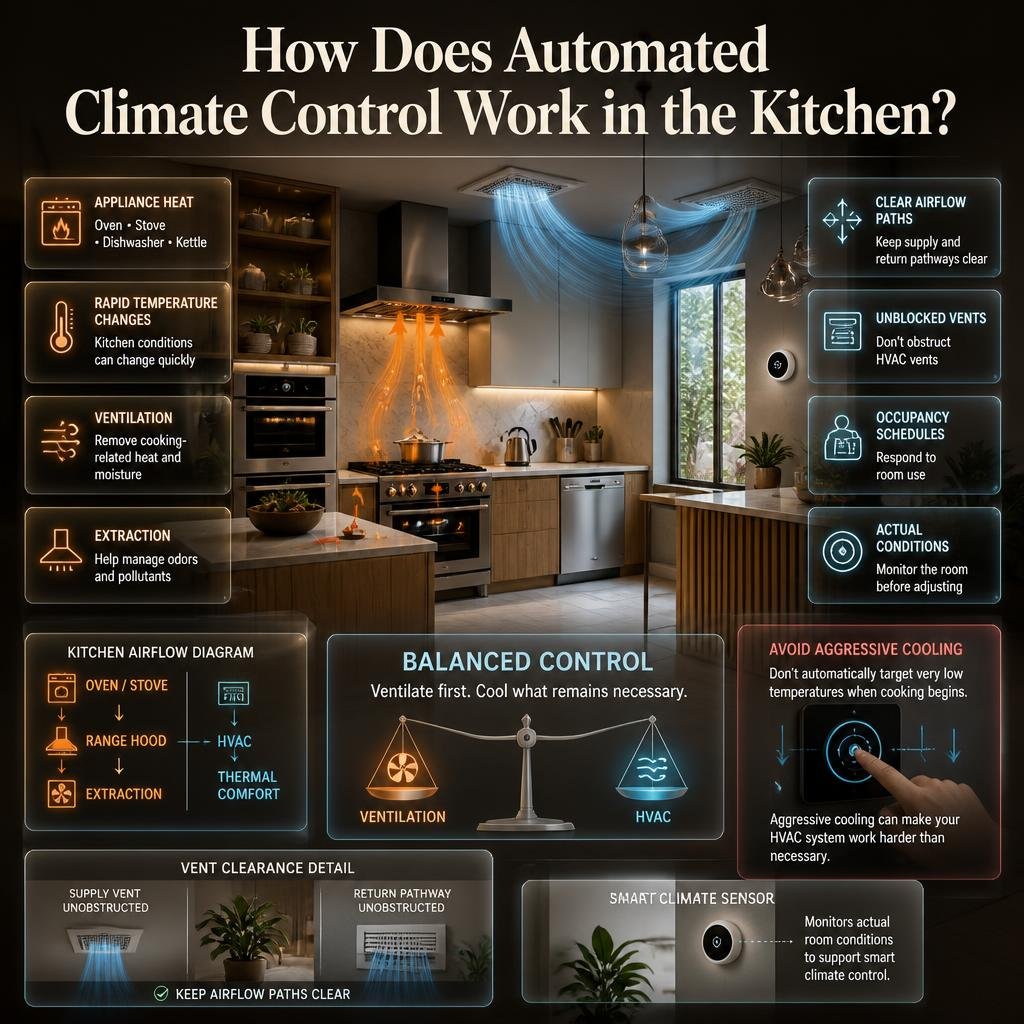
An oven, stove, dishwasher, kettle, or other appliance can raise the room temperature.
But HVAC shouldn’t be expected to solve every kitchen problem.
Proper ventilation is equally important.
A range hood or appropriate extraction system can remove cooking-related heat, moisture, odors, and pollutants. Air conditioning then handles the remaining thermal comfort requirements.
Common Kitchen Automation Mistake
One common mistake is programming extremely aggressive cooling whenever cooking begins.
That can make the HVAC system work harder than necessary.
Instead:
- Use effective cooking ventilation.
- Keep the HVAC supply and return pathways clear.
- Avoid blocking vents.
- Use occupancy schedules.
- Monitor actual room conditions.
- Avoid unnecessarily low temperature targets.
The objective is balanced control rather than maximum cooling.
Can Bathrooms Have Automated Climate Control?
Bathrooms often have short occupancy periods, so continuous climate conditioning may not be necessary.
However, comfort can become important during bathing, especially when outdoor temperatures are low or humidity is high.
A bathroom automation strategy may combine:
- Occupancy detection
- Humidity sensing
- Ventilation control
- Short schedules
- Temperature adjustment
Humidity deserves special attention.
After a shower, moisture can rise quickly. Good ventilation helps remove that moisture before it contributes to condensation and long-term building problems.
Automated ventilation can sometimes continue operating for a period after occupancy ends, depending on the system.
This is a good example of why room automation shouldn’t focus only on temperature.
What Is the Best Strategy for Guest Rooms?
Guest rooms are usually occupied less frequently than primary bedrooms.
Maintaining full comfort settings 24 hours a day when nobody is using the room may be unnecessary.
A guest room can instead use a setback mode while vacant and switch to a comfort setting before expected use.
For example:
Vacant → Energy-saving mode → Guest arrival → Comfort mode → Guest departure → Setback
However, the room shouldn’t be allowed to reach conditions that could cause moisture problems or damage.
Automation should always have sensible minimum and maximum limits.
How Does Zoned HVAC Work?
Zoned HVAC divides a property into separate areas and controls airflow or conditioning independently.
In a ducted system, motorized dampers can regulate how much conditioned air moves toward different zones.
A simplified example looks like this:
                 HVAC UNIT
                     |
          -----------------------
          |          |          |
       Zone 1     Zone 2     Zone 3
          |          |          |
       Bedroom     Office     Living
When the bedroom needs cooling but the office doesn’t, the system can adjust airflow according to the zoning design.
But proper zoning is more than installing dampers.
The HVAC system must be able to handle changing airflow requirements.
Poorly designed zoning can result in:
- Excessive static pressure
- Poor airflow
- Short cycling
- Uneven temperatures
- Increased equipment stress
- Noise
This is why professional HVAC design matters when installing a substantial zoning system.
What Sensors Are Useful for Automated Climate Control?
A smart climate system can use several types of sensors.
Temperature Sensors
These are the basic building blocks.
They tell the system how warm or cool a particular room is.
Temperature sensors are especially useful when one central thermostat doesn’t represent the conditions in every occupied area.
Occupancy Sensors
Occupancy sensors can determine whether a room is being used.
They can support:
- Vacancy settings
- Comfort activation
- Lighting integration
- Schedule adjustments
- Energy-saving routines
However, different occupancy technologies have different detection capabilities.
Movement detection isn’t necessarily the same as knowing whether someone is quietly sitting in a room.
Humidity Sensors
Humidity sensors are particularly valuable in:
- Bathrooms
- Kitchens
- Bedrooms
- Laundry areas
- Humid climates
High humidity can make a room feel warmer even when the temperature reading doesn’t appear unusually high.
Air-Quality Sensors
More advanced systems may monitor indicators such as:
- CO₂
- Particulate matter
- VOCs
These measurements can help inform ventilation strategies.
They don’t replace required safety devices or professional indoor-air-quality assessment, but they can provide useful information.
How Does Smart Scheduling Improve Room Comfort?
Scheduling is one of the simplest and most effective forms of climate automation.
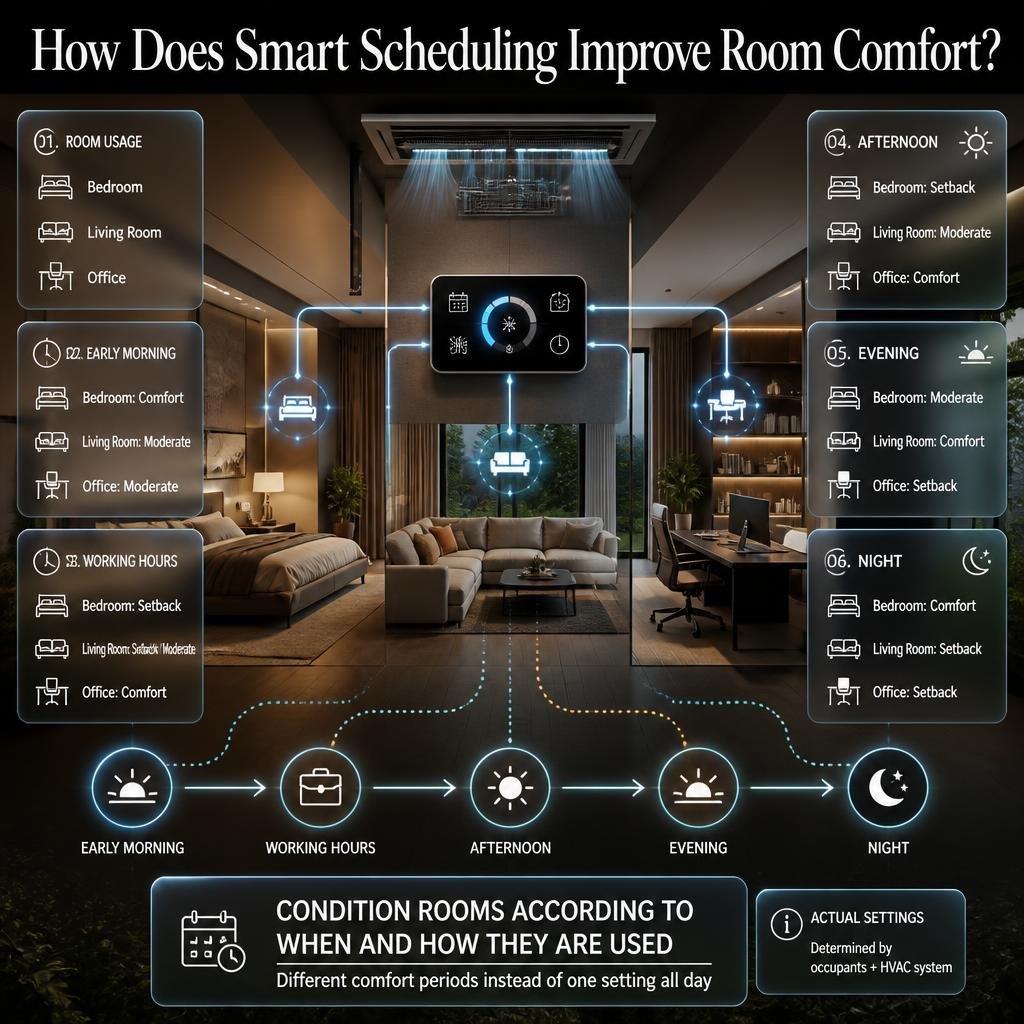
Instead of asking the system to maintain one temperature all day, create different comfort periods.
For example:
| Time | Bedroom | Living Room | Office |
|---|---|---|---|
| Early morning | Comfort | Moderate | Moderate |
| Working hours | Setback | Setback/Moderate | Comfort |
| Afternoon | Setback | Moderate | Comfort |
| Evening | Moderate | Comfort | Setback |
| Night | Comfort | Setback | Setback |
The actual settings should be determined by the occupants and HVAC system.
The principle is what matters:
Condition rooms according to when and how they are used.
Can Interior Design Affect Climate Control?
Absolutely.
Climate automation works best when the physical room isn’t fighting against the HVAC system.
Large windows, poor shading, air leaks, inadequate insulation, and blocked vents can all create thermal problems that automation alone can’t solve.
This is why climate planning should be considered alongside Interior Design.
For example, a room with large west-facing windows may experience significant afternoon heat gain. Smart cooling can respond to the temperature, but external shading or appropriate window treatments may reduce the heat entering the room in the first place.
Good design reduces the workload.
Automation manages the remaining variation.
Do Paint Colors Affect Room Comfort?
Paint color doesn’t replace insulation or mechanical cooling, but interior finishes can influence how people visually perceive a space.
Light colors can make a room feel visually brighter and more open, while darker finishes can create a warmer, more enclosed visual atmosphere.
For homeowners already planning a smart-home upgrade, Paint Color provides related inspiration for choosing finishes that work with the room’s overall character.
The key is not to confuse visual perception with actual air temperature.
A dark wall doesn’t automatically make a room physically hot enough to require more cooling.
Solar exposure, windows, insulation, air movement, and HVAC performance matter much more.
Can Wall Treatments Affect Indoor Climate?
Walls form part of the building envelope, so their construction and insulation can influence thermal performance.
Decorative wall treatments themselves aren’t usually a substitute for proper insulation, but the overall wall assembly can affect how quickly indoor conditions change.
Before adding more sophisticated automation, check whether the room has obvious building-envelope problems.
For ideas related to wall finishes and treatments, see Wall Treatments.
A smart thermostat can’t fix a major air leak around a window.
It can only react to the consequences.
What Building Problems Should Be Fixed Before Automation?
Automation should not hide fundamental construction or maintenance problems.
Look for:
- Damaged window seals
- Air leaks
- Poor insulation
- Blocked vents
- Dirty filters
- Poorly sealed ductwork
- Excessive solar gain
- Moisture problems
- Malfunctioning equipment
For homeowners reviewing these practical issues, Mintpaldecor Home Repair Inspiration can complement the climate-planning discussion by focusing on broader home repair and maintenance considerations.
The general principle is simple:
Fix the physical problem before trying to automate around it.
Can Low-Impact Materials Support Better Climate Planning?
Material selection and climate control are not identical subjects, but they can overlap during a larger home project.
Durable and responsibly selected materials can support a long-term renovation strategy, while insulation, windows, shading systems, and building-envelope materials directly affect thermal performance.
If you’re combining sustainability with comfort, How to Design a Home Using Low-Impact Materials provides a useful related resource.
A good low-impact strategy should consider the complete lifecycle of the project rather than simply selecting a material because it has a sustainability label.
Think about:
- Durability
- Maintenance
- Replacement frequency
- Material quantity
- Responsible sourcing
- Existing material reuse
- Long-term performance
How Can Outdoor Landscaping Affect Indoor Climate?
Outdoor design can influence indoor comfort, particularly around windows and exposed walls.
Trees, planting, pergolas, shade structures, and other landscape elements can potentially reduce direct solar exposure depending on their location and design.
This doesn’t mean landscaping should be treated as a replacement for HVAC.
Instead, think of it as part of a larger environmental strategy.
For outdoor planning ideas, Robert MyGardenAndPatio can be useful when considering how gardens and patios interact with the home.
A shaded outdoor area beside a sun-exposed window can change the amount of solar radiation reaching that part of the building.
Can You Design Your Own Garden to Improve Home Comfort?
You can plan many aspects of a garden yourself, especially basic planting, layout, and decorative decisions.
However, climate-related landscaping should consider the property’s orientation, mature plant size, drainage, irrigation, maintenance requirements, and local environmental conditions.
If you’re exploring the planning side, Can I Design My Own Garden Kdagardenation provides another related perspective.
The important point is to avoid planting purely for immediate shade without thinking about long-term growth.
A small tree can eventually become a major structural or maintenance consideration.
How Can Intelligent Lighting Work With Climate Automation?
Smart-home systems become more useful when different systems communicate with each other.
For example, occupancy detection might:
- Turn on appropriate lighting.
- Confirm that a room is occupied.
- Adjust climate settings.
- Change the room’s evening scene.
- Return the room to an energy-saving mode when vacant.
Lighting can also influence comfort perception.
Bright lighting during the day and warmer lighting in the evening can change how a room feels even when the physical temperature stays the same.
For more connected-home ideas, see Intelligent Lighting.
The goal isn’t to automate everything.
The goal is to make everyday routines easier.
How Should You Plan Automated Climate Control During a Home Renovation?
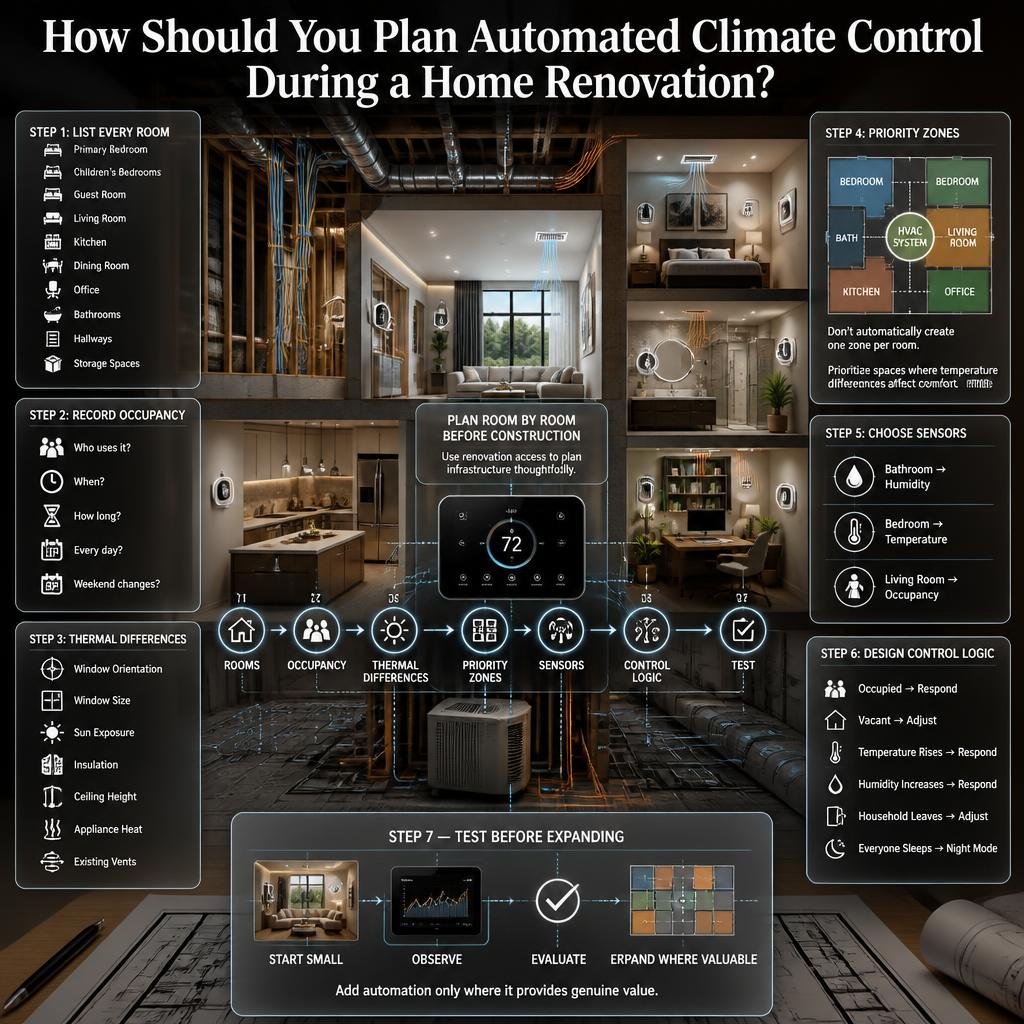
Renovation is often a convenient time to plan climate automation because walls, ceilings, ducts, electrical systems, and other infrastructure may already be accessible.
Before construction begins, create a room-by-room plan.
Step 1: List Every Room
Write down:
- Primary bedroom
- Children’s bedrooms
- Guest room
- Living room
- Kitchen
- Dining room
- Office
- Bathrooms
- Hallways
- Storage spaces
Step 2: Record Occupancy Patterns
Ask:
- Who uses this room?
- At what time?
- For how long?
- Is it occupied every day?
- Does its use change on weekends?
Step 3: Identify Thermal Differences
Look at:
- Window orientation
- Window size
- Sun exposure
- Insulation
- Ceiling height
- Appliance heat
- Existing vents
Step 4: Identify Priority Zones
Don’t automatically create one zone per room.
Start with spaces where temperature differences actually affect comfort.
Step 5: Choose Sensors
Select sensor types based on the room.
A bathroom may benefit from humidity sensing.
A bedroom may mainly need temperature sensing.
A living room may benefit from occupancy detection.
Step 6: Design the Control Logic
Decide what should happen when:
- A room becomes occupied
- A room becomes vacant
- Temperature rises
- Humidity increases
- The household leaves
- Everyone goes to sleep
Step 7: Test Before Expanding
Start with a few important rooms.
Observe the system.
Then add more automation only where it provides genuine value.
What Are the Most Common Automated Climate Control Mistakes?
Mistake 1: Installing Too Many Sensors
More sensors don’t automatically mean better control.
If the system has excessive data but poor control logic, the result can become confusing.
Better approach: Install sensors where the information can actually influence a useful decision.
Mistake 2: Creating Too Many Zones
A separate zone for every small room can increase complexity and installation costs.
Better approach: Group rooms with similar schedules and thermal behavior.
Mistake 3: Ignoring Sensor Placement
A sensor beside a window or air outlet may report an unrepresentative temperature.
Better approach: Place sensors in representative occupied areas.
Mistake 4: Making Aggressive Temperature Changes
Some homeowners program large temperature changes because they assume this will save more energy.
But frequent and extreme changes can create comfort problems and may not provide the expected benefit.
Better approach: Use moderate setbacks and observe actual performance.
Mistake 5: Ignoring Humidity
A room can technically have a reasonable temperature and still feel uncomfortable because of high humidity.
Better approach: Consider humidity control where appropriate.
Mistake 6: Forgetting Ventilation
HVAC temperature control isn’t the same as fresh-air ventilation.
Better approach: Treat ventilation as a separate part of indoor environmental quality.
Mistake 7: Automating Around a Building Problem
If a room overheats because of poor shading or a damaged window seal, increasing HVAC operation may hide the symptom without addressing the cause.
Better approach: Correct the physical problem first.
Mistake 8: Buying Hardware Before Checking Compatibility
Smart controls aren’t universally compatible with every HVAC configuration.
Better approach: Confirm system compatibility before purchasing equipment.
What Do Professionals Consider Before Designing a Climate-Control System?
A practical design starts with the building rather than the technology.
Professionals typically need to consider:
- HVAC type
- Equipment capacity
- Duct design
- Airflow
- Zone size
- Insulation
- Windows
- Solar exposure
- Occupancy
- Humidity
- Ventilation
- Electrical requirements
- Control compatibility
A beautiful smart-home interface won’t compensate for an incorrectly sized HVAC system.
Likewise, adding a temperature sensor to a badly insulated room won’t solve the underlying problem.
The best automation is built on a sound physical system.
Should Every Room Have Its Own Thermostat?
Not necessarily.
Giving every room an independent thermostat may sound ideal, but it can create unnecessary expense and complexity.
A better strategy is often to identify rooms with genuinely different needs.
For example:
Bedroom + adjacent bedroom: Similar overnight use
Office: Daytime use
Living room: Evening use
Guest room: Occasional use
Kitchen: Variable heat load
These differences can help determine where independent control is worthwhile.
The question isn’t:
“Can I control every room?”
The better question is:
“Which rooms benefit enough from independent control to justify it?”
How Much Automation Is Actually Necessary?
A good system should feel almost invisible.
You shouldn’t need to open an app ten times a day just to maintain comfortable conditions.
Start with a few high-value automations:
- Bedroom nighttime schedule
- Office working-hours schedule
- Living-room occupancy automation
- Guest-room setback
- Bathroom humidity response
Once these work reliably, add additional functions only when there’s a real reason.
This keeps the system understandable and easier to maintain.
How Does Climate Control Fit Into Overall Home Improvement?
Climate automation should be viewed as one component of a broader home strategy.
A renovation may involve:
- Insulation
- Windows
- Lighting
- Flooring
- Wall finishes
- Furniture layout
- Smart controls
- HVAC upgrades
- Outdoor shading
- Storage
- Ventilation
Improving one area while ignoring another can limit the overall result.
For homeowners evaluating the bigger picture, Why Home Improvement Is Important provides broader context for thinking about comfort, function, maintenance, and long-term value.
The important lesson is that smart technology works best when it complements good design rather than attempting to replace it.
A Practical Room-by-Room Climate Planning Checklist
Before installing or upgrading automated climate control, ask these questions for every major room:
Bedroom
- When is it occupied?
- Does it overheat at night?
- Is the sensor correctly positioned?
- Is humidity a concern?
- Does the room receive direct sunlight?
Living Room
- When is it normally occupied?
- Does occupancy change significantly?
- Are vents unobstructed?
- Does the room receive afternoon sun?
Home Office
- What are the working hours?
- Is there computer equipment generating heat?
- Is the desk near a window?
- Should pre-conditioning happen before work?
Kitchen
- How effective is the ventilation?
- Which appliances generate the most heat?
- Is the HVAC airflow adequate?
- Does cooking create rapid temperature changes?
Bathroom
- Does humidity rise quickly?
- Is ventilation adequate?
- Is occupancy short and predictable?
- Would humidity-based automation be useful?
Guest Room
- How often is it occupied?
- Can it use a setback schedule?
- Does it require minimum humidity or temperature protection?
This room-by-room assessment is more useful than buying smart devices first and trying to figure out what to do with them afterward.
What Does a Good Automated Climate System Look Like?
A well-designed system should have five characteristics.
1. It Understands the Home
The controls reflect the actual floor plan and HVAC architecture.
2. It Understands Occupancy
Rooms are conditioned according to real usage patterns.
3. It Responds Gradually
The system doesn’t constantly make dramatic changes.
4. It Works With the Building
Insulation, windows, shading, ventilation, and HVAC performance are considered together.
5. It Is Easy to Override
Residents should always be able to make a temporary adjustment when circumstances change.
This last point is important.
Automation should serve the occupants.
It shouldn’t make the occupants serve the automation.
Can automated climate control really control the temperature of each room separately?
Automated climate control can provide different temperature settings for different rooms, but the level of control depends on the home’s HVAC system. A smart thermostat alone usually controls one main system, while true room-by-room control may require compatible room sensors, motorized dampers, smart vents, separate HVAC units, or a properly designed zoning system.
The important thing is to match the technology with the existing heating and cooling setup. Simply installing multiple temperature sensors doesn’t automatically create independent climate zones. The sensors need to communicate with equipment capable of responding to the different room requirements.
For example, a bedroom can follow a cooler nighttime schedule while a home office maintains a comfortable daytime setting. Meanwhile, an unused guest room can operate at an energy-saving setting until it is needed.
Practical points to consider:
Check HVAC compatibility before buying smart controls.
Use separate zones where rooms genuinely have different needs.
Place sensors where they represent the actual room environment.
Avoid creating unnecessary zones just for the sake of automation.
Have complex duct zoning evaluated by a qualified HVAC professional.
Is automated room-by-room climate control worth it for saving energy?
Room-by-room climate automation can reduce unnecessary heating or cooling by adjusting conditions according to occupancy and schedules. However, the amount of energy saved depends heavily on the building, HVAC equipment, climate, insulation, zoning design, and how the system is programmed.
The biggest opportunity usually comes from rooms that remain unused for long periods. A guest bedroom, rarely used study, or daytime sleeping area doesn’t necessarily need the same conditioning as an occupied living room or office.
A common mistake is assuming that the more aggressively the system changes temperatures, the more energy it will save. Excessive adjustments can create comfort problems and may cause the HVAC system to cycle unnecessarily.
A better strategy is to use reasonable temperature setbacks combined with occupancy and time-based automation.
For better results:
Start with rooms that have predictable occupancy patterns.
Use schedules before adding complicated automation rules.
Avoid extreme temperature changes.
Don’t condition empty rooms unnecessarily.
Fix air leaks and insulation problems before relying on smart controls.
Monitor actual energy and comfort results after installation.
The goal isn’t simply to use less HVAC. It’s to use it where and when it’s actually needed.
What is the best way to automate bedrooms, living rooms, and home offices differently?
The most effective approach is to create climate schedules around how each room is actually used. Bedrooms typically need stable overnight comfort, living rooms often have evening and weekend demand, while home offices commonly need conditioning during working hours.
For a bedroom, automation can gradually prepare the room before bedtime and maintain a relatively stable setting overnight. A home office can be pre-conditioned before the workday and move into an energy-saving mode after working hours. A living room can respond to evening occupancy and reduce conditioning when the family is away.
This room-specific approach is more practical than applying one schedule to the entire property.
A simple planning model looks like this:
Bedroom: Nighttime comfort + daytime setback
Living room: Evening comfort + occupancy control
Home office: Working-hours schedule
Guest room: Setback while vacant
Bathroom: Short-term comfort + humidity management
Kitchen: Occupancy control + proper ventilation
The exact temperature settings should still be based on the occupants’ comfort preferences, local conditions, and HVAC capabilities.
Professional planning tips:
Identify the normal occupancy hours for each room.
Consider sunlight and window exposure.
Keep temperature sensors away from vents and direct sunlight.
Avoid rapid temperature changes.
Review schedules when household routines change.
Give occupants an easy manual override when needed.
What sensors are needed for automated climate control in different rooms?
Temperature sensors are the foundation of room-based climate automation, but they aren’t necessarily the only sensors worth using. Depending on the room and the sophistication of the system, occupancy, humidity, and air-quality sensors can provide additional information for smarter decisions.
A bedroom may primarily need a temperature sensor because its main requirement is stable nighttime comfort. A bathroom can benefit more from humidity sensing because showering can create rapid moisture increases. A living room may benefit from occupancy detection because its usage can change throughout the day.
Sensor placement is just as important as the sensor itself. A temperature sensor positioned directly beside a window, air-conditioning outlet, lamp, or electronic device may produce readings that don’t represent the room as a whole.
Useful sensor types include:
Temperature sensors: Monitor room temperature.
Occupancy sensors: Identify whether a space is being used.
Humidity sensors: Help monitor moisture conditions.
Air-quality sensors: Can provide information about indoor air conditions.
Outdoor sensors: Can provide additional environmental information in advanced systems.
Best-practice checklist:
Install sensors in representative occupied areas.
Keep them away from direct sunlight.
Don’t place them directly above supply vents.
Avoid heat-producing appliances and electronics.
Use humidity sensing in moisture-prone rooms.
Don’t install sensors simply because more data sounds better.
The best sensor is one that provides information the climate-control system can actually use.
What are the biggest mistakes to avoid when installing automated climate control for different rooms?
The biggest mistake is treating smart climate technology as a substitute for proper HVAC and building design. Automation can respond to temperature problems, but it can’t fully correct poor insulation, air leakage, badly balanced ductwork, inadequate ventilation, blocked vents, or an incorrectly sized HVAC system.
Another common mistake is creating too many independent zones. While controlling every room separately sounds attractive, unnecessary zones can increase installation cost and complexity without providing meaningful comfort improvements.
Poor sensor placement is another frequent problem. A sensor exposed to sunlight or positioned directly in the path of conditioned air can give the system inaccurate information, causing it to overcool or undercool the space.
It’s also important not to over-automate. If the system constantly reacts to every small occupancy or temperature change, the home can become less comfortable rather than more comfortable.
Avoid these common problems:
Don’t buy smart equipment before checking HVAC compatibility.
Don’t create a separate zone for every room automatically.
Don’t place temperature sensors beside vents or windows.
Don’t ignore humidity and ventilation.
Don’t use extreme temperature setbacks.
Don’t block supply or return vents with furniture.
Don’t automate around problems that should be repaired.
Don’t make the system so complicated that occupants can’t easily control it.
Professional approach: Start with the rooms that have the biggest comfort differences, install the minimum useful equipment, monitor how the system behaves, and then expand the automation only where it provides a clear benefit.
Conclusion
Automated climate control for different rooms is not simply about making a home warmer or cooler. It is about creating a more comfortable, efficient, and practical environment where each room can respond to how it is actually used. A bedroom may need a cooler and quieter setting at night, while a home office may need consistent daytime comfort and a living room may require stronger climate control when the family gathers.
The most effective approach is to avoid treating the entire home as one climate zone. Room sensors, smart schedules, occupancy detection, humidity monitoring, and properly planned zoning can work together to deliver better control without making the system unnecessarily complicated.
Before installing any automated system, consider the room’s size, usage pattern, sunlight exposure, insulation, windows, occupancy, and existing HVAC setup. Good automation should solve real comfort problems rather than adding technology simply because it is available.
A well-planned system can also support broader home improvement goals by reducing unnecessary energy use, improving everyday comfort, and making the home easier to manage. Whether you are building a new property, renovating an existing space, or upgrading one room at a time, thoughtful climate planning can make a noticeable difference in how the home feels and performs.
The key is balance: use automation where it provides genuine value, choose sensors and controls according to each room’s needs, and make sure the underlying HVAC system is properly designed and maintained. When technology, room planning, insulation, ventilation, and interior design work together, automated climate control becomes a practical part of a comfortable modern home rather than just another smart-home feature.