
Introduction
Whole Home Automation Planning | Imagine arriving home after a long day and finding the entrance illuminated, the living room comfortable, and your window blinds positioned exactly as you prefer. With one simple command, the lights dim, the entertainment system activates, and unnecessary appliances remain switched off. You don’t need to open several apps or adjust every device separately.
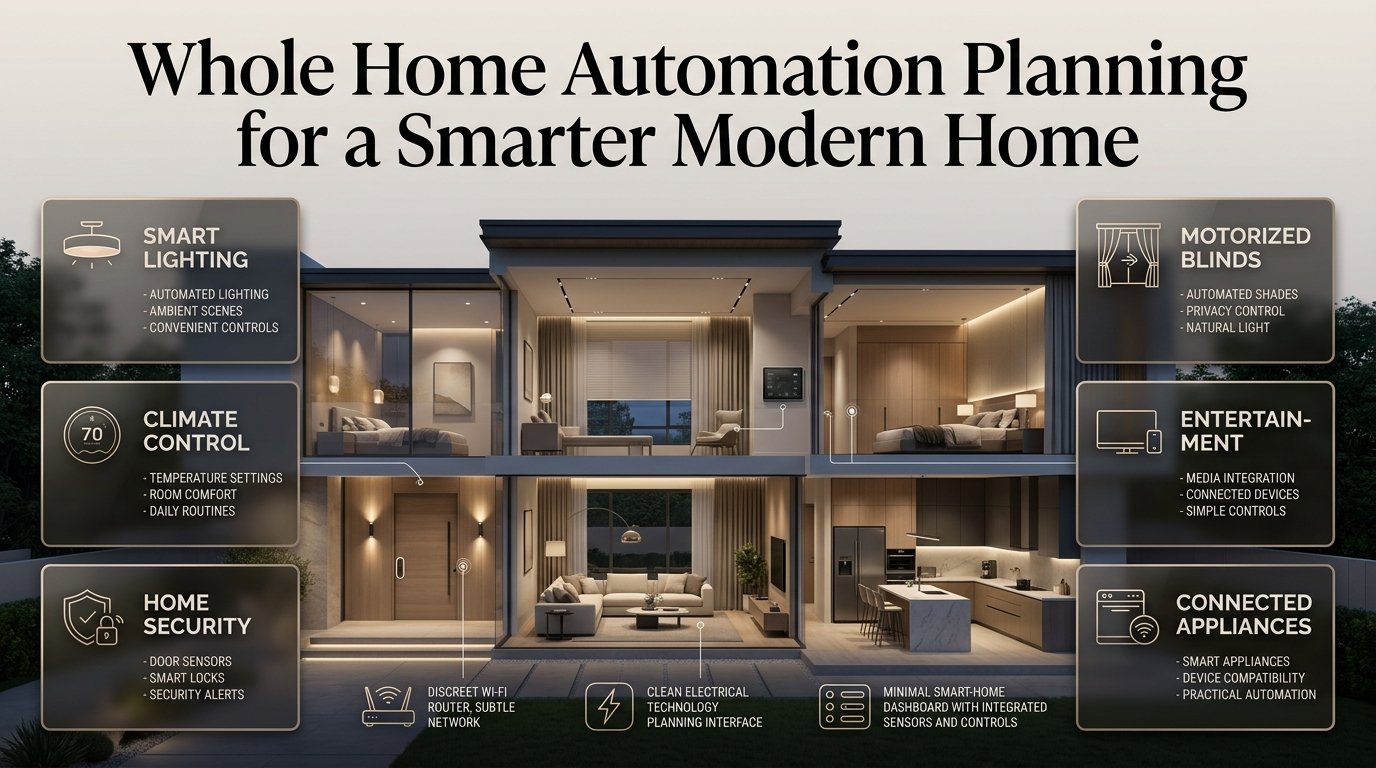
This is the real purpose of whole home automation planning. It involves designing a connected home where lighting, climate control, security, motorized window treatments, entertainment, and selected appliances work together according to your needs.
However, a smart home doesn’t become reliable simply because you install more devices. Without proper planning, homeowners can end up with incompatible products, weak network coverage, confusing controls, unnecessary expenses, and automation routines that don’t work as expected.
The better approach is to plan the entire experience before purchasing equipment. By considering your home’s layout, electrical infrastructure, daily routines, budget, and future requirements, you can create a smart home that feels natural rather than complicated.
In this guide, you’ll learn how to plan a complete home automation system, select compatible technologies, organize devices room by room, manage installation costs, avoid common mistakes, and create an efficient system that can adapt as your household changes.
What Is Whole Home Automation Planning?
Whole home automation planning is the process of designing a connected system in which different household devices communicate and perform coordinated actions. It involves selecting suitable equipment, choosing a control platform, preparing the necessary infrastructure, and deciding how automation should respond to everyday activities.
The objective is to make the home easier to manage without requiring residents to control every device individually.
A well-planned system may include:
- Smart lighting: Automated switches, dimmers, occupancy sensors, and lighting scenes.
- Climate management: Compatible thermostats, temperature sensors, and heating or cooling schedules.
- Home security: Door sensors, cameras, smart locks, and selected alerts.
- Automated window treatments: Motorized blinds, curtains, and shades.
- Entertainment: Coordinated televisions, speakers, and media controls.
- Energy management: Consumption monitoring and appropriate appliance scheduling.
- Water protection: Leak sensors and compatible automatic shutoff equipment.
- Centralized control: A suitable app, controller, voice interface, or wall-mounted panel.
These components can operate independently when necessary while sharing information through a compatible automation platform.
For example, a homeowner might create an evening scene that dims selected lights, closes the blinds, and prepares the entertainment system. Another routine might switch off unnecessary lighting when the household leaves.
The key is that every device has a clear purpose. Whole-home automation should solve everyday problems rather than introduce technology that residents rarely use.
Why Should You Plan Home Automation Before Buying Equipment?
Planning before purchasing devices helps prevent compatibility problems, unnecessary spending, and installation changes. It also makes the finished system easier to operate, maintain, and expand.
A smart product may have excellent features on its own, but those features become less useful if the product cannot communicate with your chosen platform or requires additional equipment you didn’t budget for.
Avoid compatibility problems
Different smart home products use different communication methods and software platforms. Some connect through Wi-Fi, while others use Zigbee, Z-Wave, Thread, Bluetooth, or wired connections.
Matter is a connectivity standard designed to improve interoperability among supported devices. However, compatibility still depends on the specific product, supported features, controller, and network requirements.
Before buying a device, check:
- Whether it supports your preferred control platform.
- Whether a hub, bridge, or border router is required.
- Which functions are available through your chosen app.
- Whether essential operations work without internet access.
- Whether the manufacturer provides appropriate software updates.
- Whether the product can be integrated into your intended routines.
Expert tip: Create a compatibility spreadsheet before ordering anything. Record each device’s model, connection method, required controller, installation needs, and intended purpose. This simple step can prevent expensive mistakes later.
Reduce installation and renovation costs
The timing of your project makes a significant difference.
If you’re building a house or renovating several rooms, you can plan electrical outlets, network cabling, switch locations, equipment cabinets, and motorized blind power supplies before walls and ceilings are finished.
Retrofitting these features later may involve additional labor, surface-mounted wiring, decorative repairs, or changes to existing fixtures.
For instance, a homeowner planning motorized curtains might need power near selected windows. Identifying those requirements before the final wall finishes are installed can produce a cleaner result.
Make everyday routines easier
A useful automation system should respond to the way you live.
You might want the entrance lights to activate after sunset, bedroom lighting to become softer in the evening, or the heating and cooling schedule to reflect your normal working hours.
These decisions should come before equipment selection because they determine which sensors, controls, and devices you actually need.
Which Areas of the Home Should You Automate First?
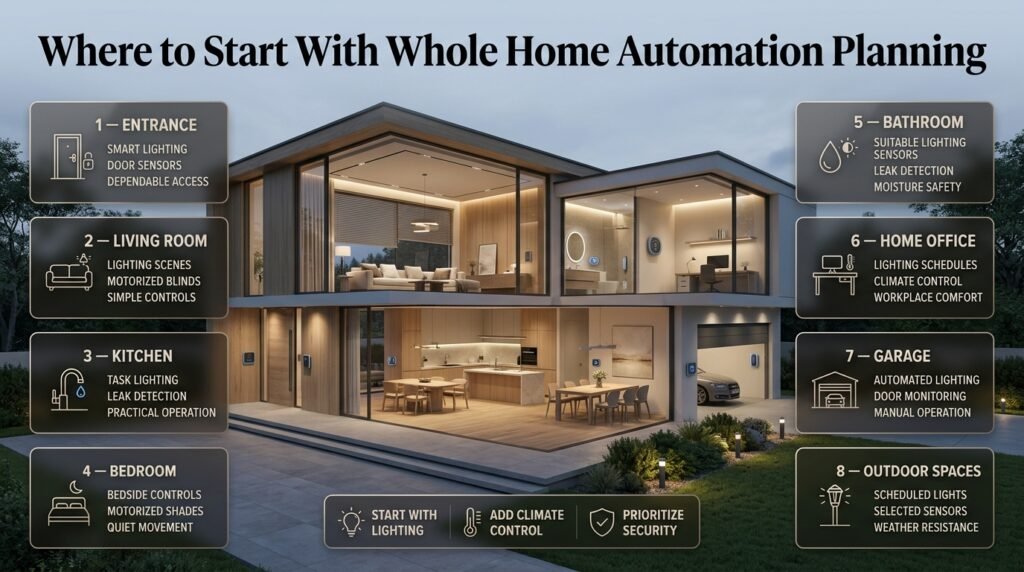
The best areas to automate depend on your household’s priorities, the existing infrastructure, and the available budget. For most homeowners, lighting, climate control, security, and dependable network coverage provide a practical starting point.
| Home area | Useful automation | Main planning consideration |
|---|---|---|
| Entrance | Lighting, door sensors, smart locks | Convenient and dependable access |
| Living room | Lighting scenes, blinds, entertainment | Comfort and simple controls |
| Kitchen | Task lighting, leak detection | Safety and practical operation |
| Bedroom | Bedside controls, motorized shades | Sleep comfort and quiet movement |
| Bathroom | Suitable lighting sensors, leak detection | Moisture and electrical safety |
| Home office | Lighting and climate schedules | Productivity and comfort |
| Garage | Lighting, door-status monitoring | Secure access and manual operation |
| Outdoor spaces | Scheduled lights, selected sensors | Weather resistance and coverage |
Start with lighting automation
Lighting is often an effective first project because the improvement is immediately noticeable.
You can install compatible smart switches, add dimmers, automate selected lamps, or create different lighting scenes for reading, relaxing, working, and entertaining.
However, smart lighting should still follow good lighting design principles. General illumination, task lighting, and accent lighting serve different purposes, so they shouldn’t necessarily operate at identical brightness levels.
Consider how light interacts with wall finishes, flooring, furniture, and decorative details. The Interior Design section provides a useful starting point for thinking about technology alongside the overall appearance of a room.
Add climate control
Compatible thermostats and room sensors can make temperature management more convenient by following schedules and responding to suitable occupancy conditions.
Before purchasing equipment, check whether your heating and cooling system supports the intended thermostat. Heat pumps, boilers, multi-zone installations, and conventional HVAC systems may have different wiring and control requirements.
Also consider room usage. A home office occupied throughout the day may need a different schedule from a guest bedroom that is rarely used.
Prioritize useful security features
Security automation can include door and window sensors, smart locks, cameras, motion detection, and notifications.
Choose features according to the property’s actual needs rather than installing every available device.
For example, a door sensor may help identify an unexpected opening, while a water-leak detector can provide an early warning near a washing machine or under a sink.
Essential access and safety functions should not depend entirely on a smartphone, internet connection, or single cloud service. Keep appropriate manual alternatives available.
How Do You Plan a Whole Home Automation System Step by Step?
A successful project follows a clear sequence: assess the property, define the required functions, select the system architecture, prepare the infrastructure, install compatible devices, and test the completed system.
Step 1: Assess your home’s layout and infrastructure
Begin by reviewing the floor plan and identifying the existing electrical, networking, heating, cooling, and security equipment.
Walk through each room and note where technology could improve comfort or convenience. Also identify physical restrictions, such as thick walls, limited ceiling access, difficult window locations, or insufficient power outlets.
Create a room-by-room inventory covering:
- Existing switches, fixtures, and appliances.
- Desired automated functions.
- Electrical and network availability.
- Potential sensor and controller locations.
- Furniture placement and everyday movement.
- Planned renovations or construction changes.
Practical example: A two-story home may have reliable Wi-Fi in the living room but poor coverage in an upstairs bedroom. Discovering this before installation allows you to plan suitable network access points rather than troubleshooting multiple devices afterward.
Step 2: Identify the routines you want to automate
Write down repetitive tasks that are inconvenient, frequently forgotten, or unnecessarily time-consuming.
Instead of simply writing “smart lighting,” describe the outcome you want.
For example:
Goal: The hallway light should switch on when someone enters after dark.
- Trigger: A suitable motion sensor detects movement.
- Condition: The ambient light level is low.
- Action: The hallway light switches on.
- Additional rule: The light switches off after an appropriate period without detected movement.
- Manual control: Residents can still switch the light on or off themselves.
This structure makes the automation easier to configure and troubleshoot.
Other useful routines include:
- Turning off selected lights when the home is unoccupied.
- Adjusting the living room lighting for movie watching.
- Closing motorized blinds at a chosen time.
- Sending a notification when a leak sensor detects water.
- Adjusting compatible climate controls around occupancy schedules.
Start with a few straightforward routines. Add more complex conditions only after the basic system works consistently.
Step 3: Choose a central control platform
The control platform organizes compatible devices and allows them to work together.
Options include Apple Home, Google Home, Amazon Alexa, Samsung SmartThings, and locally managed automation controllers.
The right choice depends on the devices you already own, your preferred interface, the features you need, and how much technical configuration you’re comfortable managing.
| Platform approach | Main advantage | Potential limitation |
|---|---|---|
| Consumer smart home platform | Familiar apps and accessible setup | Some functions rely on cloud services |
| Local automation controller | Greater control over local routines | May require additional technical knowledge |
| Professionally integrated system | Coordinated controls across multiple systems | Higher installation and configuration costs |
| Mixed-platform arrangement | Flexibility when choosing products | More compatibility checks and troubleshooting |
Before choosing, test whether the platform supports your most important functions. A product may connect successfully but still lack support for a specific sensor, advanced setting, or automation feature.
Step 4: Select wired, wireless, or hybrid automation
Your installation method affects cost, reliability, flexibility, and future maintenance.
Wired automation can be an excellent choice during new construction or major renovation. It allows suitable systems to use planned cabling and can reduce dependence on wireless communication for selected functions.
Its disadvantages include additional installation work and limited flexibility when adding new connections after the building is finished.
Wireless automation is often more convenient for existing homes. Smart bulbs, battery-powered sensors, compatible switches, and other devices can be added without extensive rewiring.
However, wireless performance depends on device placement, network coverage, interference, and battery condition.
Hybrid automation combines wired infrastructure where it offers clear advantages with wireless devices where flexibility matters more.
For example, a homeowner might use wired network connections for fixed equipment and wireless sensors for doors, windows, and room occupancy.
There is no single approach that works best for every property. Choose according to the building’s condition, the system’s requirements, and the cost of making future changes.
Step 5: Plan electrical and network infrastructure
The infrastructure supports every connected device, so it deserves attention before equipment is installed.
Review the electrical supply, existing switch wiring, available outlets, network coverage, and any equipment that requires a dedicated power source.
Your planning checklist should include:
- Appropriate electrical outlets and circuits.
- Compatibility between smart switches and existing wiring.
- Network access point locations.
- Power supplies for controllers and bridges.
- Suitable cabling for fixed equipment.
- Accessible, ventilated equipment cabinets.
- Backup power where appropriate for critical equipment.
Don’t assume every smart switch works with every existing circuit. Some products require a neutral conductor, while dimmers may have restrictions relating to load type or minimum wattage.
Electrical modifications should be handled by a qualified professional in accordance with applicable local requirements.
Step 6: Plan each room separately
Room-by-room planning helps you choose devices that support specific activities without creating unnecessary complexity.
Entrance and hallway: Prioritize convenient lighting, reliable access, and sensors positioned to detect normal movement.
Living room: Consider coordinated lighting, entertainment controls, and motorized window treatments. Keep wall controls accessible even when furniture arrangements change.
Kitchen: Focus on task lighting, appropriate appliance controls, and water-leak detection. Avoid placing ordinary electronic equipment where it could be exposed to moisture or heat.
Bedroom: Use quiet devices, convenient bedside controls, and suitable window coverings. Avoid relying exclusively on voice commands to control essential lights.
Bathroom: Select equipment suitable for the environment and ensure electrical installations meet relevant safety requirements.
Home office: Consider separate task lighting, glare management, and temperature adjustments that reflect working hours.
Garage and outdoor areas: Use equipment designed for the location, and preserve appropriate manual operation for doors and gates.
Room-specific planning also helps identify where automation might interfere with normal activities. A motion sensor positioned behind a tall cabinet, for example, may fail to detect movement reliably.
Step 7: Create coordinated scenes and routines
A scene changes several device settings together. An automation performs an action in response to a trigger, schedule, or set of conditions.
A Good Morning scene might gradually increase bedroom lighting, open compatible blinds, and adjust the temperature according to household preferences.
An Away routine might switch off selected lights, adjust the thermostat, and notify residents about a detected leak.
A Movie Night scene could dim the living room lights, close the blinds, and prepare the entertainment equipment.
Use consistent names and avoid overlapping rules. If one automation opens the blinds at sunrise while another closes them whenever motion is detected, the system may behave unpredictably.
For every routine, decide what happens when the trigger is incorrect, a sensor stops responding, or a resident wants to override the action.
Step 8: Test the system and document its settings
After installation, check every device individually before testing the complete routines.
Verify that lights respond correctly, sensors detect movement in their intended locations, and the controller recognizes all required devices.
Then test practical failure scenarios:
- What happens if the internet connection fails?
- Can residents still use physical light switches?
- What happens if a sensor battery becomes depleted?
- Can the system recover after a power interruption?
- Does a routine still behave correctly when two people are home?
- Are notifications useful rather than excessive?
Keep a record of device models, installation locations, settings, and recovery instructions. This information makes future repairs, upgrades, and troubleshooting considerably easier.
Which Smart Home Technologies Should You Choose?
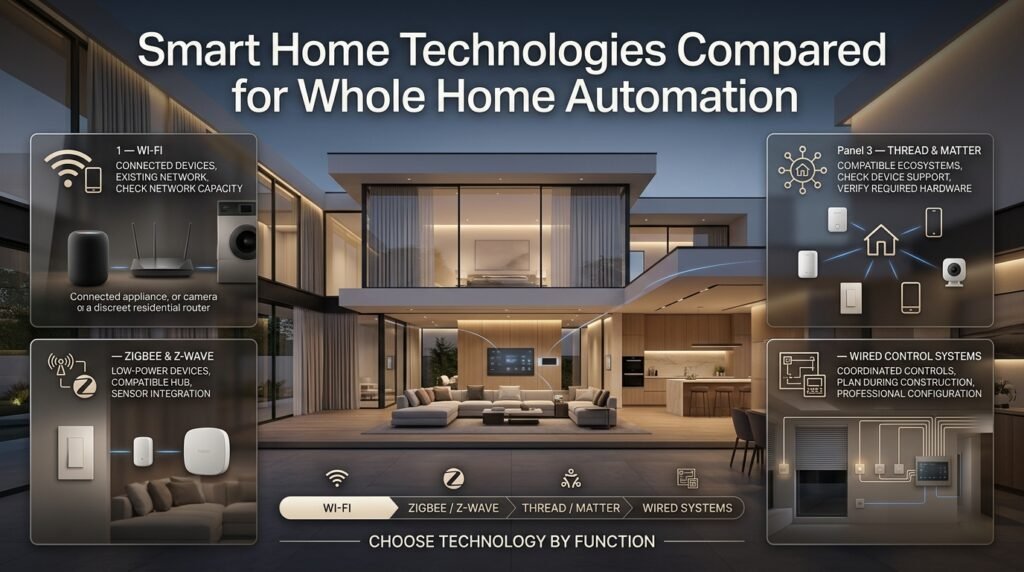
The best technology depends on the type of device, the property’s layout, the desired level of control, and the platform you select.
Wi-Fi
Wi-Fi is widely available and works well for many connected devices, including cameras, speakers, and selected appliances.
Its main advantage is that it often uses existing network infrastructure. However, a large number of poorly managed devices can make troubleshooting more difficult, and some products depend heavily on manufacturer cloud services.
Use Wi-Fi when the device benefits from its capabilities and the network can support it reliably.
Zigbee and Z-Wave
Zigbee and Z-Wave are wireless technologies commonly used for low-power smart home devices, including sensors, switches, and certain locks.
They generally require a compatible controller or hub. Their suitability depends on device availability, regional requirements, network design, and the features supported by the selected equipment.
They can be useful when building a system with many small devices that don’t need the same bandwidth as cameras or streaming equipment.
Thread and Matter
Thread is a low-power wireless networking technology, while Matter is a connectivity standard designed to help supported devices work across compatible smart home ecosystems.
They are related but not interchangeable. Some Matter devices use Wi-Fi, while others use Thread and require an appropriate Thread border router.
Before purchasing a product, check its exact requirements and supported functions. The presence of a compatibility logo doesn’t guarantee that every advanced feature will be available in every app.
Wired control systems
Wired systems can be suitable for larger projects, new construction, and homes where coordinated lighting, blinds, climate controls, and other functions need dependable integration.
They often require more planning, installation work, and professional configuration. However, they can provide a structured foundation for systems intended to remain in place for many years.
Professional recommendation: Choose the communication method according to the job. Don’t force every device onto one technology if a mixed approach better suits the property.
How Much Does Whole Home Automation Cost?
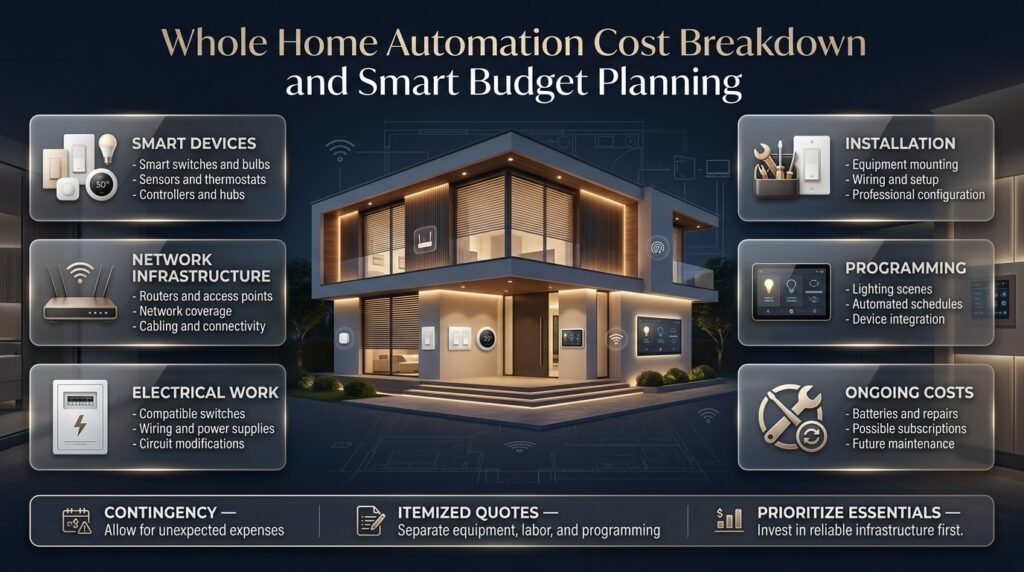
The cost depends on the size of the home, the number of devices, the chosen control platform, the amount of electrical work, and whether installation and programming are handled professionally.
A modest setup may involve a few switches, bulbs, and sensors. A comprehensive installation may include centralized lighting, multiple climate zones, motorized blinds, security equipment, network upgrades, and coordinated control panels.
Rather than relying on a single price estimate, build your budget around the actual requirements of the property.
| Cost category | What to consider |
|---|---|
| Devices | Switches, sensors, thermostats, controllers |
| Network | Routers, access points, cabling |
| Electrical work | New circuits, compatible switches, power supplies |
| Installation | Mounting, wiring, configuration |
| Programming | Scenes, schedules, and integration |
| Ongoing costs | Batteries, subscriptions, repairs |
| Contingency | Unexpected compatibility or installation problems |
Ask installers for itemized quotations that clearly distinguish equipment, labor, programming, and ongoing service costs.
A low initial quotation may not include every bridge, network upgrade, or programming task needed to achieve your intended results.
💡 Pro tip: Invest in dependable infrastructure and essential controls before spending heavily on premium features. A reliable network and intuitive lighting controls can provide more practical value than a large collection of devices that rarely work together.
For related renovation ideas, explore Home Improvement and DIY Home Projects.
How Can Whole Home Automation Improve Energy Efficiency?
Home automation can help reduce unnecessary energy use by coordinating lighting, climate control, and selected appliances. However, the results depend on how the system is configured, the efficiency of the existing equipment, and household behavior.
Simply installing connected devices doesn’t guarantee lower electricity bills.
Automate lighting intelligently
Use compatible dimmers, efficient lighting, occupancy sensors, and schedules to reduce unnecessary operation.
For example, hallway lights can switch off after a suitable period without detected movement, while outdoor lighting can follow a schedule appropriate for the season.
Avoid overly aggressive timers in rooms where people may remain still for long periods, such as reading areas or home offices.
Improve climate schedules
A compatible thermostat can adjust heating or cooling around actual occupancy and preferred temperatures.
Consider when rooms are used rather than applying one schedule to every space. However, follow equipment requirements and avoid settings that compromise comfort or safe operation.
Coordinate motorized window treatments
Blinds and shades can help manage daylight, glare, privacy, and solar heat gain.
Their effectiveness depends on window orientation, glazing, fabric, climate, and how they are operated. For instance, a suitable shade may reduce direct afternoon sunlight in a room with strong western exposure.
Coordinate these routines with lighting and climate controls to avoid unnecessary adjustments.
The Automated Window Treatment Planning guide can help you consider mounting requirements, control options, and the relationship between window coverings and the room.
Monitor actual energy consumption
Where compatible monitoring equipment is available, review energy use before and after introducing new routines.
This can help identify appliances that consume unexpected amounts of electricity or reveal whether a schedule is producing a meaningful improvement.
Focus on measurable results rather than assuming that every automation saves energy.
What Are the Most Common Whole Home Automation Planning Mistakes?
The most common mistakes involve choosing devices too early, ignoring infrastructure, creating unnecessary routines, and forgetting how people will use the finished system.
Buying devices without checking compatibility
Why it happens: A product looks useful or is available at a discount.
Why it causes problems: It may require another hub, a separate app, or functions that aren’t supported by your main platform.
How to avoid it: Verify compatibility and required features before purchasing. Keep a record of the devices you intend to use together.
Underestimating network coverage
Why it happens: Homeowners assume their current router will cover every room.
Why it causes problems: Devices may respond slowly, disconnect, or fail to trigger routines consistently.
How to avoid it: Test coverage in the intended installation locations and plan suitable access points. Pay particular attention to multiple floors, thick walls, and detached areas.
Automating everything at once
Why it happens: Installing every feature at the same time appears faster and more convenient.
Why it causes problems: Troubleshooting becomes difficult because several devices and rules can interact.
How to avoid it: Install a small group first, test it thoroughly, and expand in stages.
Depending entirely on apps and voice commands
Why it happens: Digital controls seem more advanced than traditional switches.
Why it causes problems: Residents may struggle if a phone is unavailable, internet access fails, or voice recognition doesn’t work.
How to avoid it: Preserve suitable physical controls and manual alternatives for essential functions.
Ignoring privacy and security
Why it happens: Device setup receives more attention than account protection and software maintenance.
Why it causes problems: Weak credentials, excessive permissions, and outdated software can expose private information.
How to avoid it: Use unique passwords, multifactor authentication where supported, regular firmware updates, and carefully managed user permissions. Review camera placement and recording settings.
Forgetting the interior design
Why it happens: Technology is planned separately from furniture, lighting, and window treatments.
Why it causes problems: Sensors become obstructed, wall controls are difficult to reach, and visible cables disrupt the room’s appearance.
How to avoid it: Coordinate device locations with furniture dimensions, circulation routes, wall finishes, and window treatments.
For example, a sensor placed behind a tall shelving unit may not detect movement properly. Similarly, a control panel positioned behind an open door may be difficult to access.
The guide to Layering Textures Without Overcrowding can help you consider how visible technology fits into a balanced interior.
How Should You Plan Smart Home Lighting and Furniture Together?
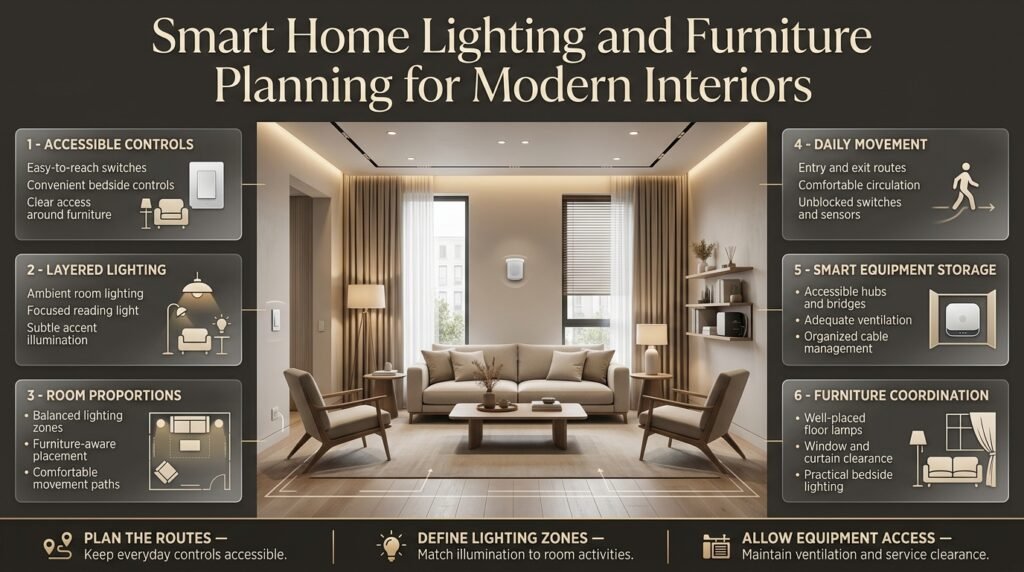
Lighting controls, sensors, and furniture arrangements should be designed together because each affects the way people move through and use a room.
A well-positioned switch remains accessible after the furniture is installed. A sensor detects the movement it was intended to monitor. Lighting scenes highlight the room’s useful features without creating glare or uncomfortable brightness.
Position controls according to daily movement
Consider where residents enter a room, where they sit, and which activities take place there.
A living room may need separate controls for general lighting, reading lamps, and accent lights. A bedroom may benefit from convenient bedside controls that operate the appropriate fixtures without requiring someone to cross the room.
Avoid locating important controls where furniture, curtains, or doors could block access.
Coordinate lighting with room proportions
Large rooms may require several lighting zones, while smaller spaces may benefit from simpler arrangements.
Automation should support the intended visual balance rather than switching every fixture on at once. Different brightness levels can help define dining, reading, and relaxing areas within the same open-plan space.
For furniture-related planning, explore Understanding Furniture Proportions and Japandi Furniture Proportions.
These considerations are particularly useful when planning wall-mounted controls, floor lamps, concealed lighting, and furniture near windows.
Plan storage around control equipment
Some installations need hubs, bridges, power supplies, or network equipment. These components should be placed where they can receive appropriate ventilation and remain accessible for maintenance.
Avoid sealing equipment inside an unsuitable cabinet or placing it where cables become difficult to inspect.
Wall shelves and storage furniture can provide useful organization, but their dimensions and placement should not compromise ventilation or wireless performance.
How Can You Make Whole Home Automation Secure and Reliable?
A reliable smart home needs more than compatible devices. It also requires secure accounts, appropriate permissions, supported software, and sensible behavior during failures.
Protect accounts and connected devices
Use unique passwords for important accounts and enable multifactor authentication when available.
Install supported firmware updates and remove access for people who no longer need it. Review connected services periodically, especially when replacing phones, changing household arrangements, or selling equipment.
Separate convenience from essential safety
Automation can support security, but it shouldn’t create unnecessary risks.
For example, avoid configuring a door to unlock automatically based only on an unreliable presence signal. Consider whether a manual confirmation or additional condition is appropriate.
Similarly, never assume a connected smoke alarm, water sensor, or security device will provide the required protection simply because it appears in a smart home app. Follow the product’s safety requirements and maintain any required independent protective equipment.
Understand local and cloud control
Some systems execute routines locally, while others rely on cloud services.
Local operation can reduce dependence on internet availability for supported functions, but its benefits vary by device and platform. Remote access, notifications, voice assistants, and some advanced features may still require external services.
Before installation, identify which functions must remain available during an outage and test them under realistic conditions.
Keep a recovery plan
Know how to restore access if a controller fails, a network changes, or a device needs to be replaced.
Maintain appropriate account recovery methods and document essential settings. For critical systems, understand the manufacturer’s recovery process before a problem occurs.
What Do Professionals Recommend for Long-Term Automation Planning?
Professional planning focuses on reliability, maintainability, accessibility, and the relationship between technology and the building.
The most useful system isn’t necessarily the one with the most features. It’s the one that consistently performs the functions residents need.
Design around the household
Start by understanding the daily routines of everyone who will use the home.
A household with children may prioritize accessible lighting and reliable door monitoring. Someone who works remotely may benefit more from office lighting and temperature control. A property that remains empty for long periods may need dependable leak notifications and carefully configured security routines.
Avoid designing the entire system around one person’s preferences if other residents need different controls.
Make the system easy to maintain
Use consistent device names, document installation details, and keep important controllers accessible.
A clear naming system makes troubleshooting easier. For example, “Bedroom Ceiling Light” is more useful than an arbitrary device number.
Review automation rules when furniture, room usage, or household routines change. Remove outdated rules that no longer serve a purpose.
Plan for future expansion
Your requirements may change as you add rooms, replace appliances, or introduce new technologies.
Where practical, allow suitable capacity for additional network equipment, controllers, and electrical connections. Choose products with a reasonable support outlook and understand the implications of relying on proprietary equipment.
Future flexibility doesn’t mean purchasing every possible accessory now. It means avoiding design choices that unnecessarily prevent sensible upgrades.
Coordinate installers and interior designers
Complex projects may involve electricians, network specialists, automation integrators, and interior designers.
Give each professional a clear understanding of the intended system and the locations of important equipment. This reduces the risk of conflicting installation decisions.
Before hiring an installer, ask:
- Which devices and communication standards do you support?
- Which functions work without internet access?
- What happens if the main controller fails?
- Who owns and administers the system accounts?
- What is included in programming and testing?
- Are ongoing subscriptions or service agreements required?
- Will you provide documentation and recovery instructions?
For project coordination, see Questions to Ask an Interior Design Consultant and Interior Designer Contract Essentials.
Clear responsibilities and written installation requirements help prevent misunderstandings before work begins.
How Much Does Whole Home Automation Planning Cost?
The cost of whole home automation planning depends on the size of your property, the number of devices, the installation method, and the level of integration you want. A basic setup with smart lighting, a few sensors, and app-based controls usually requires a smaller investment than a complete system featuring centralized lighting, motorized blinds, climate control, security equipment, and professional programming. The most effective approach is to establish a budget before purchasing devices and divide the project into essential features and optional upgrades.
Professional installation, electrical modifications, network improvements, and ongoing subscriptions can also affect the total cost. Homeowners should request itemized quotations so they can compare equipment, installation, programming, and maintenance expenses separately.
Important budgeting considerations:
Prioritize essential functions such as lighting, security, and climate control.
Include the cost of hubs, bridges, network equipment, and compatible controllers.
Set aside a contingency budget for unexpected installation requirements.
Choose expandable technology so you can add devices without replacing the entire system.
Which Smart Home System Is Best for Whole Home Automation?
The best smart home system is the one that supports your preferred devices, fits your household’s routines, and provides reliable control without unnecessary complexity. Platforms such as Apple Home, Google Home, Amazon Alexa, and Samsung SmartThings offer different combinations of device compatibility, voice control, and automation features. Some homeowners may also prefer local automation controllers for greater control over routines and reduced dependence on cloud services.
Before selecting a platform, check whether your lighting, thermostats, security devices, and motorized window treatments can work together as intended. Matter can improve interoperability between supported products, but it doesn’t guarantee that every device feature will be available across every platform. Your decision should be based on actual compatibility rather than brand popularity alone.
What to check before choosing a system:
Compatibility with your existing and planned smart devices.
Availability of local automation and offline functionality.
Ease of use for every household member.
Privacy settings, software updates, and account security.
Support for future upgrades and additional rooms.
Can You Install Whole Home Automation in an Existing House Without Major Renovations?
Whole home automation can often be added to an existing property without extensive renovation. Wireless smart switches, compatible bulbs, battery-powered sensors, smart thermostats, and plug-in devices can provide useful automation while reducing the need for new wiring. This makes gradual upgrades practical for homeowners who want to improve their homes without opening walls or replacing existing electrical infrastructure.
However, not every device is suitable for every property. Some smart switches require a neutral wire, motorized blinds may need a nearby power source, and larger systems can benefit from improved network coverage or additional cabling. Before installation, review the existing wiring, device specifications, and Wi-Fi coverage to identify any necessary upgrades. Electrical modifications should be completed by a qualified professional.
Practical installation tips:
Start with a small group of compatible devices in frequently used rooms.
Test network coverage before installing wireless sensors and controllers.
Check switch wiring and electrical requirements before ordering products.
Consider a hybrid setup that combines wired infrastructure with wireless devices.
Expand gradually after confirming that the first automations work reliably.
Does Whole Home Automation Work Without an Internet Connection?
A well-planned home automation system can keep some functions working during an internet outage, but the result depends on the devices, controller, and automation architecture. Local lighting controls, supported sensor routines, and certain scheduled actions may continue operating when they are processed within the home. However, remote access, cloud-based voice assistants, and some notifications may become unavailable until the connection is restored.
This distinction is important when planning essential functions. Homeowners should understand which devices depend on cloud services and which can operate locally. They should also preserve suitable manual controls for lighting, access, and other everyday tasks. Testing offline behavior before relying on the system helps reveal weaknesses while there is still time to address them.
Reliability features worth prioritizing:
Local control for important functions wherever practical.
Physical switches and appropriate manual overrides.
Clear recovery procedures for controllers and network equipment.
Backup power for selected equipment when justified.
Regular testing after major software or network changes.
Can Whole Home Automation Reduce Electricity Bills and Improve Energy Efficiency?
Whole home automation can help reduce unnecessary electricity use by coordinating lighting, heating, cooling, and selected appliances. For example, compatible occupancy sensors can switch off lights in unused spaces, smart thermostats can follow appropriate schedules, and motorized blinds can help manage sunlight and solar heat. Energy-monitoring devices can also help homeowners identify equipment that consumes more electricity than expected.
However, savings are not automatic. Results depend on the home’s existing efficiency, climate, equipment, household routines, and how the automation is configured. A smart device that remains active unnecessarily may provide little benefit. The best approach is to identify avoidable energy use, introduce targeted automations, and compare consumption before and after making changes.
Practical ways to improve efficiency:
Use occupancy sensors in suitable low-traffic areas.
Schedule heating and cooling around actual household routines.
Combine efficient lighting with compatible dimmers.
Coordinate window coverings with daylight, glare, and indoor temperature.
Monitor energy consumption to identify measurable improvements.
Avoid unnecessary automation that adds complexity without reducing usage.
Conclusion
Whole home automation planning is about creating a connected living environment that makes everyday life more comfortable, convenient, secure, and energy-efficient. Instead of purchasing smart devices individually, homeowners should begin by understanding their routines, identifying their priorities, and choosing technologies that work together reliably. A well-planned system can coordinate lighting, climate control, security, smart locks, sensors, entertainment, and automated window treatments without making the home unnecessarily complicated.
The most effective approach is to start with essential features, establish a realistic budget, and select compatible devices that can support future upgrades. Wiring, Wi-Fi coverage, privacy settings, backup controls, and professional installation requirements should also be considered before making major decisions. These details help prevent compatibility issues, unexpected expenses, and frustrating installation problems later.
For a more cohesive result, smart technology should complement the home’s interior design rather than dominate it. Lighting scenes, discreet sensors, organized equipment, and thoughtfully positioned controls can improve functionality while preserving the visual character of each room. Explore DesignMode24 Interior Design for more ideas on creating practical, comfortable, and well-designed living spaces.
Ultimately, successful whole home automation is not about having the largest number of smart devices. It is about choosing the right features, integrating them carefully, and making sure they solve real household problems. With thoughtful planning and a flexible design, homeowners can create a smarter home that meets their needs today while remaining adaptable as their lifestyle and technology change.